backend-frameworks
Oak
Oak is a simple, lightweight way of creating primarily API-focused servers (not much frontend) using dneo, node, or bun.
Basics
This is an example where app.use() registers a handler/middleware that affects all routes:
import { Application, Router } from "jsr:@oak/oak";

const app = new Application();

app.use((ctx) => {
  ctx.response.body = "Hello from oak! 🐿️";
});

await app.listen({ port: 8000 });
This is an example where we create a Router instance to register routes, and then we register the router using app.use()
import { Application, Router } from "@oak/oak";

const router = new Router();

router.get("/", (ctx) => {
  ctx.response.body = "Hello world";
});

const app = new Application();
app.use(router.routes());
app.use(router.allowedMethods());

app.listen();
Application
application methods
app.use(middleware): registers the middleware globally at the root levelapp.listen(): starts the app
event listeners
You can listen to these events registered across the lifetime of the server:
"listen": triggered when the app first starts listening"close": triggered when the server shuts down"error": triggered when the server runs into an unhandled error
app.addEventListener("listen", (e) => {
  console.log(`Listening on port ${e.port}`);
});

app.addEventListener("close", () => {
  console.log("Server closed");
});

app.addEventListener("error", (e) => {
  console.error("Unhandled error:", e.error);
});
Middleware
A middleware handler is an async callback that takes a ctx object and a next function as parameters. Here is what they do:
ctx: app-wide context of typeContext, an object that is globally accessible across request-response cycles and throughout the life-cycle of the app, which is generically typed by what you pass as the initial context into theApplication()instantiation.next(): an async function that when awaited and invoked, triggers the next middleware in the request-response chain.
// Type signature
type Middleware = (
  ctx: Context,
  next: () => Promise<void>
) => Promise<void> | void;

// Example: timing middleware
app.use(async (ctx, next) => {
  const start = Date.now();
  await next();           // pass to next middleware
  const ms = Date.now() - start;
  ctx.response.headers.set("X-Response-Time", `${ms}ms`);
});

NOTE
Like how middleware in express works, calling next() doesn't stop the middleware execution, it only queues up going to the next handler in the chain. The rest of the middleware will still execute unless you have a return statement or throw an error.
If you prefer, you can also create a middleware as a class that implements a handle(ctx, next) method, implementing the MiddlewareObject interface. Then you can use this as any normal middleware.
// Implement the MiddlewareObject interface
class Logger {
  async handle(ctx: Context, next: Next) {
    console.log(`${ctx.request.method} ${ctx.request.url}`);
    await next();
  }
}

app.use(new Logger());
Just like in express, you can use multiple middleware in a chain, which execute sequentially:
// Pass multiple middleware to .use()
app.use(auth, logger, cors);

// They execute left to right, each calling next()
error-handling middleware
app.use(async (ctx, next) => {
  try {
    await next();
  } catch (err) {
    ctx.response.status = err.status ?? 500;
    ctx.response.body = { error: err.message };
  }
});
// Register FIRST so it wraps everything
auth middleware
app.use(async (ctx, next) => {
  const token = ctx.request.headers.get("Authorization");
  if (!token) {
    ctx.throw(401, "Unauthorized");
  }
  ctx.state.userId = await verifyToken(token);
  await next();
});
cors middleware
app.use(async (ctx, next) => {
  ctx.response.headers.set("Access-Control-Allow-Origin", "*");
  ctx.response.headers.set("Access-Control-Allow-Methods", "GET,POST,PUT,DELETE");
  ctx.response.headers.set("Access-Control-Allow-Headers", "Content-Type,Authorization");

  if (ctx.request.method === "OPTIONS") {
    ctx.response.status = 204;
    return;
  }
  await next();
});
Context
The Context object is the single argument to every middleware. It bridges the request, response, cookies, and app state for one HTTP cycle.
Here are all the built-in properties on the context:
ctx.request: The incoming request wrapper. Access headers, body, method, URL, IP, etc.ctx.response: The outgoing response. Set.body,.status, and.headers.ctx.cookies: ASecureCookieMap— reads cookies from the request and writes them to the response. Signed when appkeysare set.ctx.state: A typed object for passing data between middleware. Scoped to the current request.ctx.app: Reference to theApplicationinstance, including app-level state.ctx.params: Route parameters (set by the Router). e.g.ctx.params.id
type-safe custom context properties
By passing a custom type argument into the Application<ContextType> class when instantiating the app, we can create a type-safe version of the context that allows for custom properties:
interface AppState {
  userId: string;
  role: "admin" | "user";
}

const app = new Application<AppState>();

app.use((ctx) => {
  // ctx.state is typed as AppState
  ctx.state.userId = "abc123";
});
context methods
The ctx object provides utility methods over returning responses in the handler:
ctx.throw(errorCode, message): throws an HTTP error with the specified error code and messagectx.assert(condition, errorCode, message): throws an HTTP error with the specified error code and message if the condition evaluates tofalsectx.send(options): returns a file as a response, serving it statically under a URL you provide.
// Throw an HTTP error (caught by error middleware)
ctx.throw(404, "User not found");

// Assert with automatic HTTP error on failure
ctx.assert(user !== undefined, 404, "Not found");
ctx.assert(ctx.state.isAdmin, 403, "Forbidden");
Here is how to send a static file:
// Send a file from disk
await ctx.send({
  root: `${Deno.cwd()}/public`,
  index: "index.html",
  path: ctx.request.url.pathname,
});
cookies
// Get a cookie
const token = await ctx.cookies.get("session");

// Set a cookie
await ctx.cookies.set("session", "abc123", {
  httpOnly: true,
  secure: true,
  maxAge: 3600,
  sameSite: "strict",
});

// Delete a cookie
await ctx.cookies.delete("session");
Router
The Router object is the basic way to scope handlers to a certain route path.
To create a root-level router, do it like so:
const router = new Router();
You can also create a router scoped to a path:
const router = new Router({ prefix: "/api" });
Basics
import { Application, Router } from "jsr:@oak/oak";

const router = new Router();

router
  .get("/", (ctx) => {
    ctx.response.body = { status: "ok" };
  })
  .post("/users", async (ctx) => {
    const body = await ctx.request.body.json();
    ctx.response.status = 201;
    ctx.response.body = { created: body };
  })
  .put("/users/:id", async (ctx) => {
    const { id } = ctx.params;
    ctx.response.body = { updated: id };
  })
  .delete("/users/:id", (ctx) => {
    ctx.response.status = 204;
  });

const app = new Application();
app.use(router.routes());
app.use(router.allowedMethods()); // handles OPTIONS + 405
await app.listen({ port: 8000 });
Here's a more real-world example:
// 1. create the router scoped to /users
export const usersRouter = new Router({ prefix: "/users" });

// 2. define routes on router
usersRouter
  .get("/", async (ctx) => {
    ctx.response.body = await db.users.findAll();
  })
  .get("/:id", async (ctx) => {
    const user = await db.users.findById(ctx.params.id);
    ctx.assert(user, 404, "User not found");
    ctx.response.body = user;
  })
  .post("/", async (ctx) => {
    const body = await ctx.request.body.json();
    const user = await db.users.create(body);
    ctx.response.status = 201;
    ctx.response.body = user;
  });
// 3. register router and allow for CORS
app.use(usersRouter.routes());
app.use(usersRouter.allowedMethods());
route parameters
// Named param → ctx.params.id
router.get("/users/:id", (ctx) => {
  ctx.response.body = ctx.params.id;
});

// Optional param
router.get("/posts/:year?/:month?", (ctx) => {
  const { year = "all", month = "all" } = ctx.params;
});

// Wildcard
router.get("/files/(.*)", (ctx) => {
  ctx.response.body = ctx.params[0]; // matched path
});
router middleware
Using the router.use(middleware) method, you can use middleware scoped to the router, and prefix the router with a path:
const apiRouter = new Router({ prefix: "/api/v1" });

// Middleware runs before all routes in this router
apiRouter.use(requireAuth);

apiRouter.get("/me", (ctx) => {
  ctx.response.body = ctx.state.user;
});
// Matches /api/v1/me
ctx.request
request properties
here are the properties on the request object:
| Property | Type | Description |
|---|---|---|
.method | HTTPMethods | GET, POST, PUT, DELETE, etc. |
.url | URL | Parsed URL (standard URL object) |
.headers | Headers | Request headers (standard Headers) |
.hasBody | boolean | True if the request might have a body |
.body | Body | Body accessor — see below |
.ip | string | Remote IP (respects proxy headers when app.proxy=true) |
.ips | string[] | Array of IPs from X-Forwarded-For |
.secure | boolean | True if HTTPS |
.source | Request | undefined | Original Fetch API Request (if available) |
reading request body
// JSON body
const data = await ctx.request.body.json();

// Text body
const text = await ctx.request.body.text();

// Form data (application/x-www-form-urlencoded or multipart)
const form = await ctx.request.body.formData();
const name = form.get("name");

// ArrayBuffer (raw binary)
const buf = await ctx.request.body.arrayBuffer();

// ReadableStream (streaming)
const stream = ctx.request.body.stream();
reading content encoding headers
// Check what content types the client accepts
const accepted = ctx.request.accepts("json", "html");
// → "json" | "html" | undefined (best match)

const encodings = ctx.request.acceptsEncodings("gzip", "identity");
const langs = ctx.request.acceptsLanguages("en", "fr");
validating request body example
async function validateBody<T>(ctx: Context, schema: Schema): Promise<T> {
  ctx.assert(ctx.request.hasBody, 422, "Body required");
  const body = await ctx.request.body.json();
  const result = schema.safeParse(body);
  ctx.assert(result.success, 422, result.error?.message);
  return result.data as T;
}

// Usage
router.post("/users", async (ctx) => {
  const data = await validateBody(ctx, UserSchema);
  ctx.response.body = await createUser(data);
});
ctx.response
The ctx.response object is a mutable object where by setting properties like response.body or response.status, that is what will be sent when the response gets sent:
setting response body
// String → text/plain
ctx.response.body = "Hello world";

// Object → application/json (auto-serialized)
ctx.response.body = { id: 1, name: "Alice" };

// ReadableStream → streamed response
ctx.response.body = new ReadableStream(...);

// Uint8Array / ArrayBuffer → binary
ctx.response.body = new Uint8Array([0x48, 0x69]);

// null → empty body
ctx.response.body = null;
setting response status code
// Numeric
ctx.response.status = 201;
ctx.response.status = 404;

// Or use the Status enum
import { Status } from "jsr:@oak/oak";
ctx.response.status = Status.Created;   // 201
ctx.response.status = Status.NotFound;  // 404
setting response headers
ctx.response.headers.set("Content-Type", "application/json");
ctx.response.headers.set("Cache-Control", "no-cache");
ctx.response.headers.set("X-Custom-Header", "value");

// Redirects
ctx.response.redirect("/new-location");
ctx.response.redirect("https://example.com", 301);
Realtime
websockets
router.get("/ws", (ctx) => {
  if (!ctx.isUpgradable) ctx.throw(501);
  const ws = ctx.upgrade();  // sets ctx.respond = false

  ws.onopen = () => ws.send("Connected!");
  ws.onmessage = (e) => {
    console.log("received:", e.data);
    ws.send(`echo: ${e.data}`);
  };
  ws.onclose = () => console.log("disconnected");
});
SSE
router.get("/events", async (ctx) => {
  const target = await ctx.sendEvents();
  // ctx.respond is now false

  let count = 0;
  const id = setInterval(() => {
    target.dispatchEvent(
      new ServerSentEvent("update", { data: { count: count++ } })
    );
    if (count > 10) { target.close(); clearInterval(id); }
  }, 1000);
});
Fresh
Basics
Initialize a new fresh app by running this command:
deno run -Ar jsr:@fresh/init
project structure


Here are the different important folders:
components: Server react componentsroutes: file-based routingstatic: contains static assets that are publicly accessibleislands: island-architecture react-components that hydrate javascript after render
File-based routing
| File | URL |
|---|---|
routes/index.tsx | / |
routes/about.tsx | /about |
routes/blog/index.tsx | /blog |
routes/blog/[slug].tsx | /blog/:slug (dynamic) |
routes/blog/[...path].tsx | /blog/* (catch-all) |
routes/(marketing)/about.tsx | /about (route group; folder hidden) |
routes/api/joke.ts | /api/joke (API route, no default export) |
| Here are the rules for pages: |
- must export default component: The component for a page must be exported default.
Basic route page
You can create a server-rendered react page compoinent by just export defaulting a component, or you can use the defineRoute HOC:
import { defineRoute } from "$fresh/server.ts";

export default defineRoute(function Home() {
  return (
    <main>
      <h1>Hello Fresh!</h1>
      <p>Rendered on the server.</p>
    </main>
  );
});
Dynamic routes
For a dynamic route page, the page component accepts a props parameter of type PageProps, and the dynamic route params are on the props.params record.
// routes/greet/[name].tsx
import { PageProps } from "$fresh/server.ts";

export default function Greet(props: PageProps) {
  return <h1>Hello {props.params.name}!</h1>;
}
or you can do this:
import { defineRoute } from "$fresh/server.ts";
import { getPost } from "../../lib/blog.ts";

export default defineRoute(async (req, ctx) => {
  const { slug } = ctx.params;  // from [slug].tsx
  const post = await getPost(slug);

  if (!post) return ctx.renderNotFound();

  return (
    <article>
      <h1>{post.title}</h1>
      <div dangerouslySetInnerHTML={{ __html: post.html }} />
    </article>
  );
});
Dynamic catch-all routes
// routes/files/[...path].tsx
import { PageProps } from "$fresh/server.ts";

export default function Files({ params }: PageProps) {
  // /files/a/b/c → params.path === "a/b/c"
  return <pre>{params.path}</pre>;
}
Layouts
At the root level, you have the root layout at routes/_app.tsx, which wraps every single page
// routes/_app.tsx
import { PageProps } from "$fresh/server.ts";

export default function App({ Component }: PageProps) {
  return (
    <html>
      <head>
        <meta charset="utf-8" />
        <meta name="viewport" content="width=device-width, initial-scale=1.0" />
        <title>My Fresh App</title>
        <link rel="stylesheet" href="/styles.css" />
      </head>
      <body>
      {/* render <Component /> as children */}
        <Component />
      </body>
    </html>
  );
}
You can have nested layouts for a route using the _layout.tsx file:
A _layout.tsx file applies to every route in its directory (and below). For example, routes/dashboard/_layout.tsx wraps all /dashboard/* routes:
// routes/dashboard/_layout.tsx
import { PageProps } from "$fresh/server.ts";

export default function DashboardLayout({ Component }: PageProps) {
  return (
    <div class="dashboard">
      <nav><a href="/dashboard">Home</a> · <a href="/dashboard/settings">Settings</a></nav>
      <Component />
    </div>
  );
}
error pages
routes/_404.tsx— custom not-found page.routes/_500.tsx— custom server-error page; receivesprops.error.
// routes/_404.tsx
import { UnknownPageProps } from "$fresh/server.ts";

export default function NotFound({ url }: UnknownPageProps) {
  return (
    <main>
      <h1>404 — {url.pathname} not found</h1>
      <a href="/">Back home</a>
    </main>
  );
}
static content
Anything in static/ is served from the URL root:
static/logo.svg → https://yoursite.com/logo.svg
Use the asset() helper to get a content-hashed URL with long cache headers:
import { asset } from "$fresh/runtime.ts";

<img src={asset("/logo.svg")} alt="logo" />;
NOTE
Use asset() for any URL pointing at a static/ file — Fresh appends a content hash and serves with a long-lived Cache-Control.
metadata
Use the <Head> component to inject into <head> from a deeply nested page:
import { Head } from "$fresh/runtime.ts";

export default function AboutPage() {
  return (
    <>
      <Head>
        <title>About — My Fresh App</title>
        <meta name="description" content="About this site" />
      </Head>
      <h1>About</h1>
    </>
  );
}
Islands
Island theory
What happens at request time:
- Fresh server-renders the page, including
<Counter />, to HTML. - It injects a small
<script>that loads only the JS forCounterplus the Preact runtime. - The browser hydrates the counter; the surrounding HTML is never touched.
Rules and gotchas
- Props must be JSON-serializable. When rendering an island-component inside a server component, props cannot contain functions, class instances, or DOM nodes. Fresh extended the serializer to handle
Signal,Date,Map,Set,BigInt, andRegExp. childrenpassed from a route is server-rendered HTML. You can use this as a "slot":- Islands can nest. A child island inside a parent island re-uses the parent's hydration tree.
IS_BROWSERguard. ImportIS_BROWSERfrom$fresh/runtime.tsif you need to skip server-side execution (e.g., touchingwindow).

Islands vs components
- islands are meant to to be used on client components that use javascript interactions, hydrated at runtime.
- components can be server-rendered completely or be client components (use javascript) as long as they are rendered inside islands

Preact basics
Fresh uses Preact, a small (~3 kB gzipped) React-compatible library. If you know React, you already know Preact. The only differences you're likely to hit:
- Use
classinstead ofclassName(thoughclassNamealso works). - Hooks come from
preact/hooks(useState,useEffect,useRef, …). - The default state primitive in Fresh is Preact Signals (
@preact/signals), notuseState.
example 1: server-side preact component
// components/Button.tsx
import { ComponentChildren } from "preact";

interface Props {
  children: ComponentChildren;
  onClick?: () => void;
  variant?: "primary" | "ghost";
}

export function Button({ children, onClick, variant = "primary" }: Props) {
  const cls = variant === "primary" ? "btn-primary" : "btn-ghost";
  return <button class={cls} onClick={onClick}>{children}</button>;
}
NOTE
A component in components/ cannot have onClick work in the browser unless it's used inside an island. From a route, the onClick handler is stripped — Fresh ships no JS for non-island components.
example 2: signals
import { useSignal, useComputed } from "@preact/signals";

export default function Cart() {
  const items = useSignal<number[]>([]);
  const total = useComputed(() => items.value.reduce((a, b) => a + b, 0));

  return (
    <div>
      <button onClick={() => items.value = [...items.value, 10]}>Add $10</button>
      <p>Total: ${total}</p>
    </div>
  );
}
NOTE
Why signals over useState? They survive serialization between server and client (Fresh hydrates a Signal on the client with the same value the server computed), and they avoid React's re-render-the-whole-component model.
Basic Island
here is an example of a basic island component that uses preact hooks, so it needs to be a client component and thus an island:
import { useSignal } from "@preact/signals";
import { useEffect } from "preact/hooks";

export function Countdown() {
  const count = useSignal(10);

  useEffect(() => {
    const timer = setInterval(() => {
      if (count.value <= 0) {
        clearInterval(timer);
      }

      count.value -= 1;
    }, 1000);

    return () => clearInterval(timer);
  }, []);

  if (count.value <= 0) {
    return <p>Countdown: 🎉</p>;
  }

  return <p>Countdown: {count}</p>;
}
You can then render the island client component in a SSR route:
import { define } from "@/utils.ts";
import { Countdown } from "@/islands/Countdown.tsx";

export default define.page(() => {
  return (
    <main>
      <h1>About</h1>
      <p>This is the about page.</p>
      <Countdown />
    </main>
  );
});
Slot pattern
// islands/Modal.tsx
import { useSignal } from "@preact/signals";

export default function Modal({ children }) {
	const open = useSignal(false);
	return open.value ? <div class="modal">{children}</div> : null;
}
Fetching data server side
Fetching data before rendering a route
A route can export a handler to run server-side code before rendering. Handlers are objects keyed by HTTP method:
// routes/projects/[id].tsx
import { Handlers, PageProps } from "$fresh/server.ts";

interface Project { id: string; name: string; stars: number }

export const handler: Handlers<Project | null> = {
  // on a GET request to the /projects/:id route, execute this function
  async GET(_req, ctx) {
    const resp = await fetch(`https://api.example.com/projects/${ctx.params.id}`);
    if (resp.status === 404) return ctx.renderNotFound();
    const project: Project = await resp.json();

    // render the route, passing along the data as props
    return ctx.render(project);
  },
};

export default function ProjectPage({ data }: PageProps<Project | null>) {
  if (!data) return <h1>Project not found</h1>;
  return (
    <article>
      <h1>{data.name}</h1>
      <p>⭐ {data.stars}</p>
    </article>
  );
}
ctx.render(data)renders the route's default export, passingdataviaPageProps.data.ctx.renderNotFound()short-circuits to the_404.tsxpage.- All
fetchhappens on the server during the request — no client-side data fetching boilerplate, no loading spinners. - Data must be JSON-serializable if any island consumes it.
The second argument to a handler is the context ctx of type FreshContext:
interface FreshContext<State = unknown, Data = unknown> {
  params: Record<string, string>;
  url: URL;
  route: string;
  state: State;
  render: (data?: Data) => Response | Promise<Response>;
  renderNotFound: () => Response | Promise<Response>;
  remoteAddr: { hostname: string; port: number; transport: string };
  next: () => Promise<Response>; // middleware only
  destination: "route" | "static" | "internal" | "notFound";
}
Here's another example
import { Handlers, PageProps } from "$fresh/server.ts";

interface Data { message: string | null }

export const handler: Handlers<Data> = {
  // GET: render page with initial data
  async GET(req, ctx) {
    return ctx.render({ message: null });
  },

  // POST: handle form submission
  async POST(req, ctx) {
    const form = await req.formData();
    const name = form.get("name")?.toString();
    return ctx.render({ message: `Hello, ${name}!` });
  },
};

export default function Contact({ data }: PageProps<Data>) {
  return (
    <div>
      {data.message && <p>{data.message}</p>}
      <form method="POST">
        <input name="name" placeholder="Your name" />
        <button type="submit">Send</button>
      </form>
    </div>
  );
}
Typesafe route
For tighter type inference, wrap your route page in a defineRoute() HOC, which gives you access to the request and context for SSR.
import { defineRoute } from "$fresh/server.ts";

export default defineRoute(async (_req, ctx) => {
  const project = await loadProject(ctx.params.id);
  return <h1>{project.name}</h1>;
});
Server actions
You can mock server actions on form submissions by adding a route handler to a subscribe
// routes/subscribe.tsx
import { Handlers, PageProps } from "$fresh/server.ts";

interface Data { email?: string; error?: string }

export const handler: Handlers<Data> = {
  GET(_req, ctx) { return ctx.render({}); },

  async POST(req, ctx) {
    const form = await req.formData();
    const email = form.get("email")?.toString() ?? "";
    if (!email.includes("@")) {
      return ctx.render({ error: "Please enter a valid email." });
    }
    await saveSubscriber(email);
    // Post/Redirect/Get
    return new Response(null, {
      status: 303,
      headers: { Location: "/thanks" },
    });
  },
};

export default function Subscribe({ data }: PageProps<Data>) {
  return (
    <form method="POST">
      <label>
        Email <input name="email" type="email" required />
      </label>
      {data.error && <p style="color:red">{data.error}</p>}
      <button type="submit">Subscribe</button>
    </form>
  );
}
// routes/todos.tsx
import { Handlers, PageProps } from "$fresh/server.ts";
import { kv } from "../lib/db.ts";

interface Todo { id: string; text: string; done: boolean }

export const handler: Handlers<Todo[]> = {
  async GET(_req, ctx) {
    const todos = await kv.list<Todo>({ prefix: ["todos"] });
    return ctx.render([...todos].map((e) => e.value));
  },
  async POST(req, ctx) {
    const form = await req.formData();
    const text = form.get("text")!.toString();
    const id = crypto.randomUUID();
    await kv.set(["todos", id], { id, text, done: false });
    const headers = new Headers({ Location: "/todos" });
    return new Response(null, { status: 303, headers });
  },
};

export default function Todos({ data }: PageProps<Todo[]>) {
  return (
    <div>
      <form method="POST">
        <input name="text" required placeholder="New todo..." />
        <button type="submit">Add</button>
      </form>
      <ul>
        {data.map((t) => <li key={t.id}>{t.text}</li>)}
      </ul>
    </div>
  );
}
API routes
API routes are just pages in the routes folder except you don't export a react component. Just export handlers.
Don't export a default component if you just want a JSON endpoint:
// routes/api/joke.ts
import { Handlers } from "$fresh/server.ts";

const JOKES = [
  "Why did the chicken cross the road? Because of the road.",
  "Why do programmers prefer dark mode? Because light attracts bugs.",
];

export const handler: Handlers = {
  GET(_req) {
    const joke = JOKES[Math.floor(Math.random() * JOKES.length)];
    return new Response(joke, { headers: { "content-type": "text/plain" } });
  },
};
Basic API routes
import { Handlers } from "$fresh/server.ts";

export const handler: Handlers = {
  async GET() {
    const users = [{ id: 1, name: "Ada" }];
    return Response.json(users);
  },
  async POST(req) {
    const body = await req.json();
    // persist body.name...
    return Response.json({ ok: true }, { status: 201 });
  },
};
Middleware
A _middleware.ts file applies to every route at its level and below. Use it for auth, logging, header manipulation, and populating ctx.state:
// routes/_middleware.ts
import { FreshContext } from "$fresh/server.ts";

interface State { user?: { id: string; name: string } }

export async function handler(req: Request, ctx: FreshContext<State>) {
  const token = req.headers.get("authorization");
  if (token) ctx.state.user = await lookupUser(token);

  const resp = await ctx.next();
  resp.headers.set("x-served-by", "fresh");
  return resp;
}
Downstream routes can read ctx.state.user:
import { Handlers } from "$fresh/server.ts";

export const handler: Handlers<unknown, { user?: { name: string } }> = {
  GET(_req, ctx) {
    if (!ctx.state.user) return new Response("Unauthorized", { status: 401 });
    return ctx.render();
  },
};
You can also export an array to chain multiple middleware:
export const handler = [authMiddleware, loggingMiddleware];
Here's an example of an auth middleware:
import { FreshContext } from "$fresh/server.ts";
import { getSession } from "../../lib/session.ts";

export async function handler(req: Request, ctx: FreshContext) {
  const session = await getSession(req);

  if (!session?.user) {
    return new Response(null, {
      status: 302,
      headers: { Location: "/login" },
    });
  }

  // Attach user to state for downstream handlers
  ctx.state.user = session.user;
  return ctx.next();
}
Form requesting an API route
If you want a snappy client-side form, then make it an island with an onSubmit event handler that fetches an API route you establish on your server.
// islands/SubscribeForm.tsx
import { useSignal } from "@preact/signals";

export default function SubscribeForm() {
  const email = useSignal("");
  const status = useSignal<"idle" | "loading" | "ok" | "error">("idle");

  async function onSubmit(e: Event) {
    e.preventDefault();
    status.value = "loading";
    const resp = await fetch("/api/subscribe", {
      method: "POST",
      headers: { "content-type": "application/json" },
      body: JSON.stringify({ email: email.value }),
    });
    status.value = resp.ok ? "ok" : "error";
  }

  return (
    <form onSubmit={onSubmit}>
      <input
        type="email"
        value={email.value}
        onInput={(e) => email.value = (e.target as HTMLInputElement).value}
      />
      <button disabled={status.value === "loading"}>
        {status.value === "loading" ? "..." : "Subscribe"}
      </button>
      {status.value === "ok" && <p>Thanks!</p>}
    </form>
  );
}
Partials
Partials are Fresh 2's answer to HTMX. They let you update specific DOM regions without JavaScript — just f-partial attributes on links or forms.
// routes/partials/feed.tsx — returns only a fragment
import { defineRoute, Partial } from "$fresh/server.ts";

export default defineRoute(async () => {
  const posts = await fetchLatest();
  return (
    <Partial name="feed">
      {posts.map((p) => <PostCard key={p.id} post={p} />)}
    </Partial>
  );
});
Think of it as server-driven DOM diffing. Instead of shipping a JavaScript framework to update the UI, you tell Fresh "when this link is clicked, fetch this route and swap only the element named feed." The browser ships zero JS for that interaction — Fresh's tiny runtime (~2KB) handles the swap transparently.
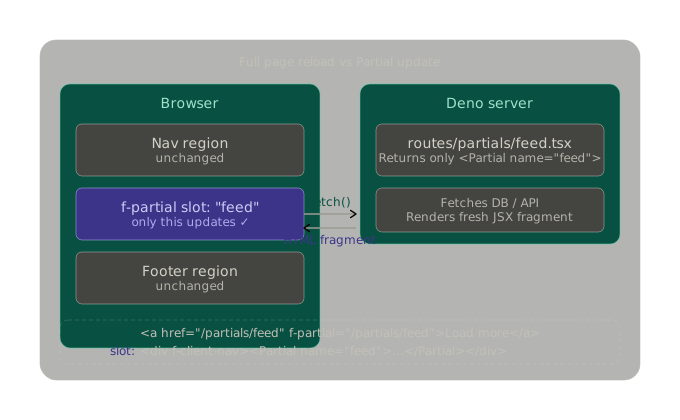
f-client-navis required on an ancestor element to opt that subtree into Fresh's client-side navigation. Without it,f-partialattributes are ignored and you get a normal full-page navigation. It's essentially the "enable partials here" switch.- Partials are not Islands. Islands hydrate in the browser and have local state. Partials are purely server-driven — the server is the source of truth, and every interaction round-trips to it. This makes Partials ideal for data that lives in a database, and Islands ideal for UI state that doesn't need to persist (open/closed menus, local counters, real-time inputs).
- You can have multiple named Partials on a single page and update them independently — or update several at once by returning multiple
<Partial>elements from one route response.
Partial example
Here's a practical, real-world example — a news feed with a "Load more" button — built step by step:
Step 1 — the page defines the slot (routes/index.tsx)
import { defineRoute, Partial } from "$fresh/server.ts";
import { getLatestPosts } from "../lib/db.ts";

export default defineRoute(async () => {
  const posts = await getLatestPosts({ limit: 5 });
  return (
    <main f-client-nav>          {/* enables Fresh's client nav on this subtree */}
      <h1>Latest posts</h1>

      {/* Named Partial slot — Fresh will target this by name */}
      <Partial name="feed">
        {posts.map((p) => <PostCard key={p.id} post={p} />)}
      </Partial>

      {/* This link triggers a partial fetch, not a full page load */}
      <a href="/partials/feed" f-partial="/partials/feed">
        Load more
      </a>
    </main>
  );
});
Step 2 — a dedicated partials route returns only the fragment (routes/partials/feed.tsx)
tsx
import { defineRoute, Partial } from "$fresh/server.ts";
import { getLatestPosts } from "../../lib/db.ts";

export default defineRoute(async (req) => {
  const url = new URL(req.url);
  const cursor = url.searchParams.get("cursor") ?? undefined;

  const posts = await getLatestPosts({ limit: 5, cursor });
  const nextCursor = posts.at(-1)?.id;

  return (
    // Same name="feed" — Fresh matches and swaps this into the DOM
    <Partial name="feed">
      {posts.map((p) => <PostCard key={p.id} post={p} />)}

      {/* The new link replaces itself too — pagination chains naturally */}

        href={`/partials/feed?cursor=${nextCursor}`}
        f-partial={`/partials/feed?cursor=${nextCursor}`}
      >
        Load more
      </a>
    </Partial>
  );
});
The key insight here is that the "Load more" link replaces itself with the next "Load more" link in each response. This is how you get infinite scroll with no JavaScript written by you.
Partial form example
// routes/todos.tsx
export default defineRoute(async () => {
  const todos = await getAllTodos();
  return (
    <div f-client-nav>
      {/* Form submits via POST, response swaps only the list */}
      <form action="/partials/todos" method="POST" f-partial="/partials/todos">
        <input name="text" placeholder="New task…" required />
        <button type="submit">Add</button>
      </form>

      <Partial name="todo-list">
        <ul>
          {todos.map((t) => <li key={t.id}>{t.text}</li>)}
        </ul>
      </Partial>
    </div>
  );
});

// routes/partials/todos.tsx
export const handler: Handlers = {
  async POST(req) {
    const form = await req.formData();
    await createTodo(form.get("text")!.toString());
    const todos = await getAllTodos();
    return (
      <Partial name="todo-list">
        <ul>
          {todos.map((t) => <li key={t.id}>{t.text}</li>)}
        </ul>
      </Partial>
    );
  },
};
Submit the form → server writes to DB → returns updated list fragment → Fresh swaps it in. The form input clears automatically. Zero JavaScript on your part.