database-theory
How databases work - basics
Intro
Read this article for a complete understanding:
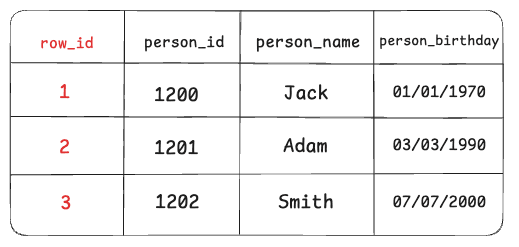
A standard table in SQL has rows and columns, but the database behind the scenes uniquely identifies each row by giving each row its own id.
Each database provider like MySQl or PostgreSQL has its own unique way of actually defining how the unique row id gets implemented, like whether it gets its unique id from the primary key of the record or as a randomly generated id.
storage models
A storage model refers to the design in a database of how the data is physically stored on the disk. There are two different types of ways you could do it:
Row Store (Row-based storage)
In a row store, all the column values for a single row are stored together. Example:
Row 1: [id=1, name="Ali", age=25]
Row 2: [id=2, name="Ayşe", age=30]
- Advantage: Very fast for row-based queries (like
SELECT * FROM table) - use case: This is the most classic and widely used storage model. (Used in systems like MySQL InnoDB, PostgreSQL, etc.)
Column Store (Column-based storage)
Here, data is stored by columns instead of rows. Example (physically stored):
Column id:   [1, 2]
Column name: ["Ali", "Ayşe"]
Column age:  [25, 30]
- Advantage: Much faster for analytical queries (like
SELECT AVG(age)) because only the needed columns are read. - Examples of column store systems: Amazon Redshift, ClickHouse, Apache Parquet files, Google BigQuery, Apache Cassandra (partially).
Pages, buffer pool, disk vs RAM
pages
A page is basically a fixed-size block of data, either in memory or on disk.
Databases don’t read a single row; instead, they read a page or more in a single I/O, giving us many rows at once. This is because databases read from the disk, not from RAM, getting into some important RAMifications we need to understand when it comes to RAM vs disk reading:
- reading from disk: Reading from disk is slow since there is inherent 3-9 ms physical latency in accessing the specific data. Therefore, to avoid many round trips, it is more efficient to gather data in bulk, which means grabbing data in pages
- reading from RAM: there is no physical latency when reading from RAM, so you don't run into the disadvantage of many round trips, making reading from RAM ideal for the use case of grabbing small pieces of data.
When a database reads from disk, it doesn’t grab just one row of a table — it grabs a whole chunk of data at once.
That chunk is called a “page”, and it’s a fixed size (commonly 4 KB or 8 KB). This is because disks are slow, so reading in bulk is more efficient than one tiny piece at a time.
In contrast, RAM is fast and can access any location directly, so small reads are fine there.
buffer pool
To mitigate some of the inherent latency behind reading from the disk and fetching data in pages, databases have a concept of the buffer pool, which acts an in-memory cache of pages.
- The database keeps a chunk of RAM called a buffer pool.
- When it reads a page from disk, it stores it in the buffer pool. That way, if it needs that page again soon, it’s already in RAM — much faster than reading disk again.
Because pages aren't just single rows - they're actually 4-8kb of row data - you get other records/rows for free in the buffer pool cache.
- When you load a page to find one row, you get other rows too — because they live on that same page.
- If each row is small, you can fit more rows per page.
- So reading one page from disk might give you dozens of rows already loaded into RAM.
- This is great for things like scanning a range of rows — because many of them are already there.
WAL mode
Writing to databases is also done in pages, where you update some pieces of data and send those changes back in bulk as pages. For this, it requires wal mode.
What is WAL? When a user updates data, the database doesn’t write the change to the data file immediately. Instead, it first records the change in a special log file called the Write-Ahead Log (WAL), also known as the journal. This log is written to disk right away, ensuring the change isn’t lost if the system crashes. Later, the actual data file is updated based on the WAL entry
Databases as I/O operations
When we say an I/O (Input/Output) operation, we’re talking about any interaction with the disk, whether it’s reading data or writing it. We try to minimize these as much as possible, the fewer I/Os we make, the faster our queries run. An I/O can fetch one page or more, depending on disk partitions and other factors.
Heap
The heap is a data structure where the table’s pages are stored one after another. This is where the actual data lives. Everything in the table is in the heap.
In a heap, pages aren’t stored in any particular order. Data gets placed wherever there’s space, so pages can be scattered and unordered. This means searching through a heap usually means scanning the entire table, which is O(n)
Indexes
Traversing the heap is an expensive operation since it contains everything. That’s why we need some kind of logic to help us find exactly which page we’re interested in, in other words, which page holds the data we’re looking for.
That’s where indexes come in. Indexes help us to tell exactly what part of the heap we need to read, or in other words, which page(s) of the heap to pull.
Indexes store pointers to the actual pages in the heap in an ordered b-tree separate from the heap, which enables O(log n) access to pages based on a specific index sorting behavior you define ahead of time.
IMPORTANT
But indexes aren’t a magical thing, they’re also stored as pages in the B-tree and require I/O to read their entries. So we need to be careful with indexes. The smaller the index, the more of it can fit in memory, and the faster the search will be.
Indexes work as storing pages in a b-tree, where each page stores a record where the column you're indexing on is mapped to the page number and the row id inside that page.
Let's walk through an example:
- A database record with page number 3, row id 56, and primary key
id= 72 is getting indexed. We are indexing on theidfield - in the index b-tree, a new record is added to an available page mapping the value of the indexing column,
id, which equals 72, to the page number (3) and row id (56) of the record with that column value. - Now, if we want to query
SELECT * FROM table_name WHERE id = 72, we perform an I/O request to the b-tree to find the page that has a record with a row-id/primary key equal to 72. - From that record in the index, we get the page number and row id of the actual record we want to query. This lets us directly fetch the actual record.
Clustered index
There is also something called a clustered index, which I’ve mentioned earlier in this article. Since it can be really helpful sometimes, I want to explain a bit more about clustered indexes. Like we said before, normally a heap table stores data in no particular order. But if you create a clustered index on a column, the table’s data will be physically organized based on that index.
NOTE
As you might guess, a table can have only one clustered index because the data can be physically sorted in only one way.
Let's consider a table: Users(id, name, age)
- If this table has no indexes, it is called a heap table. (like we said earlier.)
- If we create a clustered index on the
idcolumn:- The table is now physically sorted based on the
idcolumn. - The database stores the data according to this order.
- This makes queries like
WHERE id = 100much faster.
- The table is now physically sorted based on the
the harm of using UUIDs
This is actually very important to understand. Let’s say you’re using InnoDB and you have a completely random value like a UUID as the primary key of your table.
[!DANGER] Believe it or not, this can seriously hurt your performance. Why? Because since a UUID is completely random, each new row gets inserted somewhere in the middle or a random place in the table. This causes InnoDB to constantly reorganize data, leading to page splits and fragmentation.
Here is the thought process behind why you should not use UUIDs as a primary key:
- If you use UUIDs as a primary key, that clusters the database based on that key.
- SInce UUIDs are random, this means sorting a database based on them is impossible.
- As a result, disk and memory accesses increase, and both write and read performance degrade.
UUIDs vs autoincrement for primary key
So, if you must use UUIDs, it’s better to use them as a non-clustered index, not as the PRIMARY KEY.
For the PRIMARY KEY, using auto-increment integer values is usually better because inserts happen at the end of the table, reducing the need for reorganization.
Database scaling
partitioning
ACID compliant databases like SQL can only be viertically scaled, because otherwise horizontal scaling breaks ACID compliance.
To get around this problem and horizontally scale the databases, we use sharding, but first we have to understand partitioning.

Partitioning is simply splitting a large table into two or more subtables based on some condition.
Here is the thought process behind why partioning is so effective, using the example above:
- A table
usersindexed byidis large, containing let's say 10000 users, but we can split it into two subtables of equal size by splitting based on the conditionid < 5000, which we'll call our partition condition - Now we cut the B-tree representation of the
userstable in half, making linear searches two times faster and achieving exponential speedup when searching by the indexedidfield. - Performing CRUD on the partitioned data is also super easy, since we can find the appropriate subtable that contains the data via the partition condition.
IMPORTANT
Partitioning is simple. It's just creating subtables within the same database - it's not like you removed any data.
The main difference between partitioning and sharding is that sharding splits subtables across different machines, leading to horizontal scaling of the databse.
Sharding
Sharding is partitioning but putting the subtables across different database instances, which achieves true horizontal scaling for databases.
We will have multiple database instances and put a load balancer with a hashing algorithm rerouting traffic to them based on a shard key, where each database instance has its own unique value for the shard key and thus that's how we know which subtable lives in which database instance.
WARNING
A shard key is an arbitrary field used to determine how data is distributed across different sharded databases.
- It's critical to choose it carefully because if chosen incorrectly, data may not be evenly distributed, leading to some database clusters being overloaded while others are underutilized.
- For example, sharding by first name assumes names are evenly distributed across the alphabet, which may not be true.
Here is how sharding works when performing CRUD on a table record:
- The loader balancer receives a query request with a shard key
- The load balancer hashes the shard key to determine which database instance the table record belongs to and then forwards the request to that instance.
- Query the table from that database instance.

NOTE
The main difficulty in choosing the shard key is that sharding is most effective when you equally subdivide the data into equally-sized sections, as to take advantage of the exponential speedup that comes with downsizing B-trees to half their size.
TIP
Obviously, don't shard if you don't need to. Reach for partitioning first, and then when necessary, shard, since sharding adds additional complexity and overhead compared to partitioning.
Here are the main cons of sharding:
- complex and easy to mess up: Sharding adds the overhead and complexity of a load balancer, and you must pick your shard key correctly to equally distribute the data across instances and reap any performance benefits.
- slower for joins and multi-table queries: JOIN and any other multi-table statements will require multiple round trips to the load balancer and evaluation of shard keys, leading to slower execution time for complex queries.
Sharding for NOSQL databases
In NoSQL databases like mongo, sharding automatically happens, which is a huge advantage. This shows that NoSQL tools can be used for scale.
Database Availability
Replication
Replication is making copies of your data across multiple servers or locations, which increases fault tolerance (no single point of failure) and read performance (reads work like CDNs).
Replication works by creating multiple database instances that hold the exact same data, but designating them as one of these two functions:
- primary: The primary database isntance, handling all write operations. This is the ultimate source of truth.
- replica: Database instances that copy whatever write operations happened in the primary. These are copies of the primary. Replicas handle all read operations, rerouted from a load balancer choosing which replica to query.
NOTE
This separation of concerns, where the primary handles writes and the replicas handle reads allows for increased performance and speed.
primary / replica
- Establish one database instance as the primary, which handles all write operations.
- After each write operation to the primary, each replica copies over that written data, getting in sync with the primary. All read operations are load balanced to replicas.
- If the primary fails, any available replica takes over and becomes the new primary.
NOTE
The main advantage is improved performance for read-heavy applications, since the primary database handles all writes without being slowed down by reads, and replicas handle the read operations.

WARNING
The main con with this architecture is that you are not guaranteed consistency and you can suffer data loss. The latency between writes to the primary and updates to replicas creates this consistency gap.
We can fix this main con by always doing writes to a primary within a transaction of two steps:
- Write to primary
- Write to replica
This ACID transaction guarantees consistency, even though some data operations might fail just because of the replica even if writing to the primary succeeds.
primary/primary
This architecture is easier to reason about, where all database instances handle read and write operations and are essentially just full, bona-fide copies of each other, horizontally scaling exact copies of each database.

WARNING
The main complexity is handling conflict resolution between servers - determining how to negotiate and reconcile differences when multiple primaries are writing simultaneously. This often requires an intermediary service to rectify the data before posting to full replicas.
Replication Strategies
- transactional replication strategy
- description: In a transactional replication strategy, a write or update is not considered complete until all copies have the same data and all replicas have confirmed the write. This creates a highly consistent system.
- tradeoff: The trade-off is reduced performance and availability, as the system must wait for every database to acknowledge the write before responding, making it slower.
- snapshotting strategy
- description: Snapshotting just captures the entire database file as it is, serving as a backup.
- advantages:
- cheaper because it's not write-heavy (only occurring at periodic intervals)
- it provides better resiliency by preventing data corruption from spreading
- guarantees a rollback point to the last known good state.
- Snapshots can also be taken at any desired frequency and are easier to distribute around the world since there's no time pressure.
- tradeoff:
Sharding and replication
When you replicate after sharding, you need to replicate each sharded database individually. This means the replication strategy must be applied across all shards, adding to the complexity and resource requirements of the system.
NoSQL
Column Databases
Column databases are optimized for searching and situations where you don't need a strict structure. They store similar data together in columns (like all names in a name column), making queries for specific fields very fast. They can also reduce storage through encoding when there are repeated values, as the repetition can be represented more efficiently.