ai-websites
ChatGPT
Canvas mode
Canvas mode is a way to edit some text, like an essay or code, by "pair coding" with chatGPT.
- You can highlight text in canvas mdoe and ask chatgpt to do something abotu that highlighted text, which is faster than simply retyping it.
Code execution
You can ask ChatGPT to execute code in a python repl to give you back exact mathematical answers or to create charts with matplotlib. Here are the things you can do:
- math: get back perfect math answers by asking in a repl
- graphs: ask for perfect graphs using matplotlib
- qr codes: ask to make qr codes from a link using the
qrcodepython package
Tasks
In the chatgpt pro plan, you can ask o3-mini model to create recurring tasks for you that get executed everyday and notify you via email.
For example, you could ask gpt to send you the latest ai news every morning
ChatGPT Work

Working in projects
With ChatGPT work projects, you are just using a local folder on your computer, but not really doing it for coding and stuff like that. It's basically the same thing as Codex but you're just using it in a business context.
Work projects consist of several source folders from your filesystem, of which there are two types:
- primary source folder: The folder that GPT looks in to find
AGENTS.mdand documentation about the project. - secondary source folder: just folders on your filesystem that you grant GPT access to.
A source folder should have these two components:
AGENTS.md: rules for the project that always loads in context.tools.md: a semantic md file that you tell GPT to use as the source of truth for how to use plugins and rules for the plugins within the scope of your project.
Adding to AGENTS.md
Whenever you want ChatGPT to remember a rule or add it to the agents.md, you should just preface whatever your prompt is with "remember this rule":
"Remember this rule: Whenever I ask you to rename image files, use a short but descriptive name so I know what each image is without opening it."
Adding to tools MD
WHen adding a lot of connectors and rules for each plugin, your AGENTS.md file can get very messy, so it's important to keep it clean by offloading plugin rules to another file.
Here is how you can delegate all plugin rules to a TOOL_CONVENTIONS.md file:
"Create a Tool Conventions.md file that will house all rules governing tools moving forward. Move every tool- or plugin-specific rule from AGENTS.md into it. Replace the moved content in AGENTS.md with a link."
In-app browser
IN ChatGPT work, you can enable the in-app browser and then navigate to a site so ChatGPT has perfect web-control and execution over a website while being secure.
- Press
CMD + T(Mac) orCTRL + T(Windows) to open the in-app browser in ChatGPT

- Use the annotation mode to highlight specific elements and ask ChatGPT to do something with them.
NOTE
You can also tag the @browser identifier to tell GPT to spin up the browser for you.
Here are the main use cases for using the in-app browser with GPT:
- web elements context: You can give ChatGPT context as to the visual nature of a website, which leads to these use cases:
- SEO audit: Understand what you can do to improve your SEO and AEO.
- Dead links audit: Navigate to your project pages and task the AI to crawl and verify that all links function correctly and open in new tabs
- UI/UX audit: Use the annotation feature to highlight specific page elements and ask the AI to suggest CSS improvements or identify accessibility issues.
- Mockups: create stuff like mockups or designs based on that website.
- Web Scraping Logic Testing: Use the browser to test how a website renders and ask the AI to write a scraper or parser for the specific layout you are viewing.
- Live Website Tweaks: As shown in the video, use the annotation mode to request design changes (like switching to dark mode) and have the AI implement them if connected to your platform (e.g., Ghost)
- Accessibility Audits (a11y): Browse your site's frontend and ask the AI to audit elements for missing alt text, incorrect ARIA labels, or contrast issues.
- Language-learning use cases: GPT understands the text content of a website, which allows you to do these things associated with language learning:
- Vocabulary Mining: Browse a foreign site and have the AI generate a list of the top 10 most common or useful verbs or nouns found on that specific page.
- Interactive Grammar Quizzes: Point the browser to an educational article and ask the AI to create a quiz based on the grammar rules used in that text.
Side chats
Side chats allow you to create a branching chat off of the main chat so you don't pollute the context with a side question or side prompt.
Here are the two main rules of side chats:
- Side chats retain all context from the main chat at the moment they were created. Think of it like a closure in JavaScript.
- No context from side chats leak into the main chat.
You can initiate a side chat with /side

Skills
Any action that you do with ChatGPT work, you can then turn into a repeatable skill using the skill creator built-in skill.

It builds full-fledged apps with these properties:
- chatgpt login: you login with chatgpt to access the site
- custom domain: immediately publishes to the internet
- RBAC: you can share the site with people (chatgpt + email auth) or publish it to the web (no auth)
- environment variables: set env vars
Sites
By typing in @sites into the chat, you can prompt ChatGPT to make a web app

Microsoft copilot
Microsoft copilot is cool because it has AI sidebar integration in the edge browser to analyze the contents of a website.
NotebookLM
NotebookLM is really cool and has a great use case for generating minutes of audio on the fly.
Use cases
- language use case: Use it to generate lessons and roadmaps of language learning content, and then create podcasts or voice lessons in your target language.
Deep research
You can use notebookLM to perform deep research on google drive files, allowing you to create custom workflows where you can upload a bunch of data to google drive and then have notebookLM perform deep research on them.
Once deep research is created, you can attach it to a project via Gemini gems.
Here is the complete workflow:
- Ask another model to create a detailed deep research prompt to then input into NotebookLM
You are an expert Deep Research Prompt Engineer. Your job is to help me write a detailed, robust research prompt.

I'm building toward this goal: {{describe your project's purpose and the output you want}}

## Step One: Interview
Ask me **one question at a time** to understand:
- What specific data, expertise, and insights I need
- What templates, frameworks, or best practices would be valuable
- What examples or processes I want documented
- How I want the final report structured (tables, pros/cons, trade-offs, ranked recommendations)

Along the way, play devil's advocate: where are the gaps in my thinking? What blind spots or counter-arguments am I missing?

Keep going until you have a complete picture.

## Step Two: Build the Prompt
Once you understand my needs, write a detailed Deep Research prompt in clean Markdown that will:
1. Collect all relevant information on the topic
2. Look for evidence both supporting AND countering the key argument
3. Synthesize it into a comprehensive, well-organized report in the exact format I specified
4. Include actionable examples, processes, and frameworks

---

**Start the interview now.**
- Trigger deep research with NotebookLM using the prompt you gave it
- Create a gemini gem and attach the specific NotebookLM notebook you created as context
Perplexity/Comet
Shortcuts
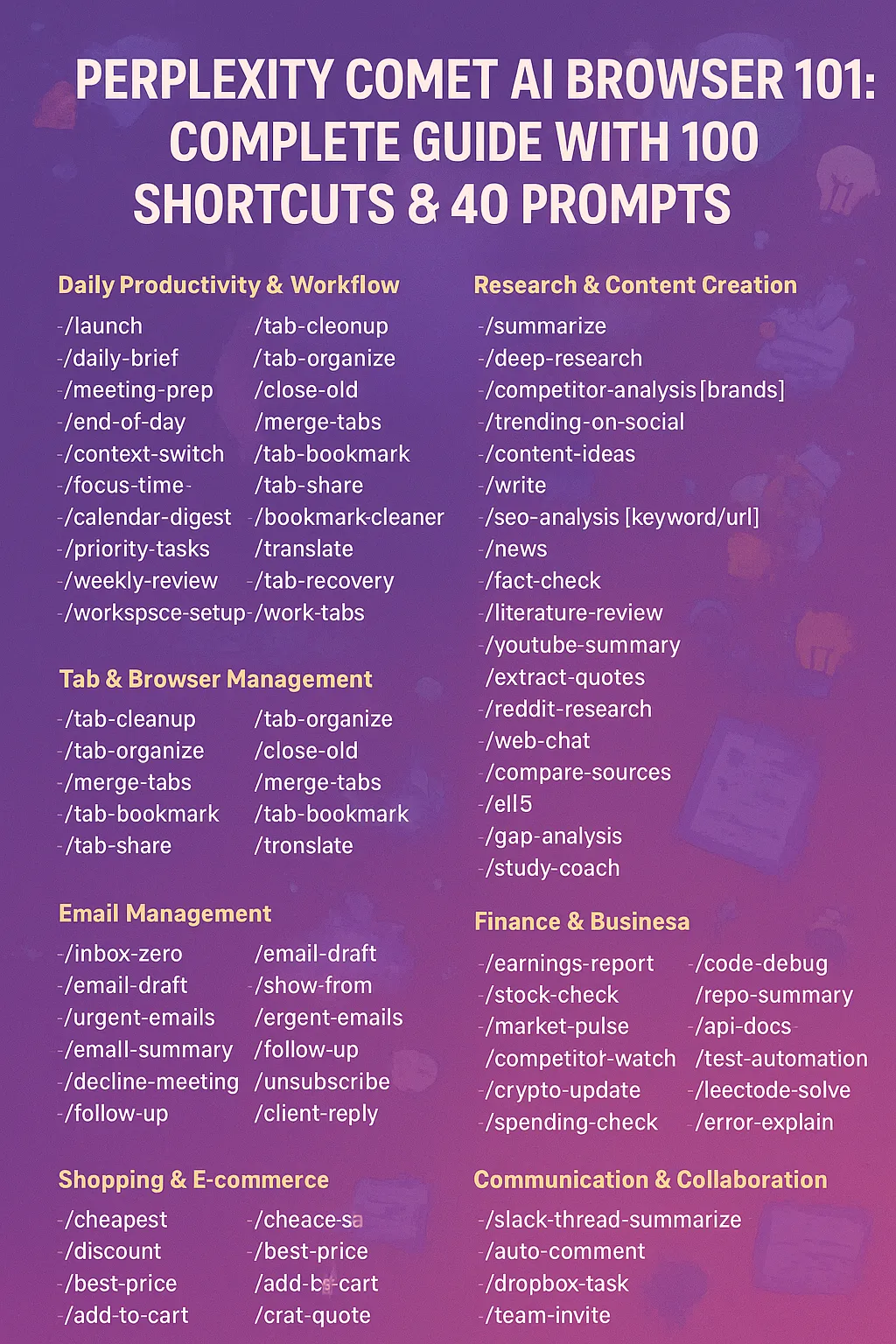
In comet, you can register special slash commands that basically just copy and paste a predefined prompt, which is useful for saving keystrokes. Here are some good shortcuts
Context
- Use
@tabor@productpageto reference any open tabs.
Gemini
Gemini in email
The best thing about gemini in email is that it has tool access to your entire google workspace.
Here are the main use cases:
- create calendar event: using an email as context, tell gemini to add an event to your google calendar.
Gemini spark
Gemini spark is the agentic version of Gemini which can perform actions like scheduled actions, write stuff to your email, etc., and is more proactive.
Creating a Spark OS drive folder
The main idea is to have a Google Drive folder where Spark OS has a single source of truth for different templates, rules, and instructions to read from when dealing with agentic tasks.
- Create a
01-spark-osfolder in your google drive. - Create a
templatessubfolder, which should be used to store basic docs templates that AI can reference for style. - Whenever you want to use a template with Gemini spark, just say in natural language to search the drive for the template or link to it via filepath.
Skills
You can ask Gemini spark to create skills, and then refer to those skills via /<skill-name> template.
You can combine skills with scheduled actions so Gemini spark runs a skill at a certain time every day.