database-frameworks
Prisma
Setup
- Install these dependencies:
npm install @prisma/client
npm i -D prisma
- Run
npx prisma init - Change anything in the
schema.prisma, for example if you want to use a different database connection URL or a different sql engine like SQLite or Postgres
Schemas
The schemas in prisma are basically syntactic sugar for creating tables in SQL, and create type-safe ORMs you can use to query those tables with. You define your schemas in the schema.prisma file:
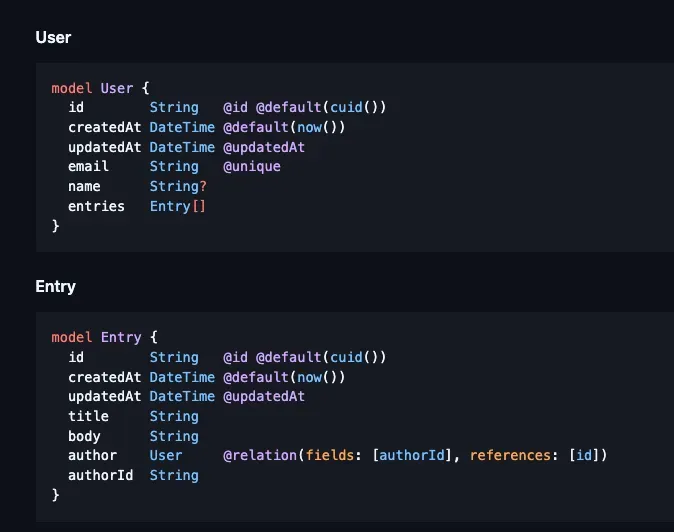
Here is what a schema.prisma file would look like for SQLite:
datasource db {
  provider = "sqlite".       // specify using swqlite
  url      = "file:./dev.db" // specify the file to use
}

generator client {
  provider = "prisma-client-js"
}

model Task {
  id          Int      @id @default(autoincrement())
  title       String
  description String?
  completed   Boolean  @default(false)
}
After each change to the schema.prisma, you have to do a database migration, which is super simple with just these commands:
npx prisma migrate dev --name <migration-name>
npx prisma generate
using the prisma client
For example, you would create a prisma client like so and then query them like so:
import { PrismaClient } from "@prisma/client";

const prisma = new PrismaClient();

prisma.user; // query user table
prisma.entry; // query entries table
Drizzle
Drizzle vs Prisma
Drizzle is built for performance on serverless environments, but in a server environment, prisma would also work well. Ease of use is with prisma.
Setup
When using drizzle, you have to setup migration generation scripts and a script to actually run that migration. The drizzle-kit package from npm makes this super easy:
The below command generates a migration sql file in the flavor of postgresql from a typescript file containing all your drizzle tables. Let's go in depth with the options there are on the drizzle-kit generate command:
drizzle-kit generate \
--schema ./drizzle/schema.ts \
--dialect postgresql \
--out=./drizzle/migrations
--schema: the typescript file with named exports of drizzle tables.--dialect: the flavor of sql to convert the tyepscript into, like expo sqlite, sqlite, postgresql, mysql, etc.- Your choices are
postgresqlormysqlorsqliteortursoorsinglestoreorgel
- Your choices are
--out: the output folder where the migration sql file should be created.
If you don't want to bother with this and instead do everything in one fell swoop, you can just use a drizzle.config.ts file at the root of your project:
import { defineConfig } from "npm:drizzle-kit";
import { drizzleConstants } from "./drizzle/drizzleConstants.ts";

export default defineConfig({
  out: "../drizzle/migrations", // outDir of migrations
  schema: "../drizzle/schema.ts", // schema file of drizzle tables
  dialect: "postgresql", // flavor of sql
  dbCredentials: {
    url: drizzleConstants.dbUrl, // db connnection url
  },
});
You can then use these commands once you have the config in place:
npx drizzle-kit push: does everything at oncenpx drizzle-kit generate: generates the migrationsnpx drizzle-kit migrate: applies the migrationsnpx drizzle-kit studio: see your DB in a studio dashboard
schema
The schema file should look like this:
import { integer, pgTable, varchar, timestamp } from "npm:drizzle-orm/pg-core";

export const usersTable = pgTable("users", {
  id: integer().primaryKey().generatedAlwaysAsIdentity(),
  name: varchar({ length: 255 }).notNull(),
  age: integer().notNull(),
  email: varchar({ length: 255 }).notNull().unique(),
  createdAt: timestamp("created_at").notNull().defaultNow(),
  updatedAt: timestamp("updated_at").notNull().defaultNow(),
});

export const postsTable = pgTable("posts", {
  id: integer().primaryKey().generatedAlwaysAsIdentity(),
  title: varchar({ length: 255 }).notNull(),
  content: varchar().notNull(),
  userId: integer()
    .notNull()
    .references(() => usersTable.id),
  createdAt: timestamp("created_at").notNull().defaultNow(),
  updatedAt: timestamp("updated_at").notNull().defaultNow(),
});
Db
The basic drizzle database needs these components:
- connection URL: the connection url to your database, which should obviously be the same database as the driver you specified in your drizzle config.
- schema: Lets drizzle know about your database tables and perform operations with them.
The basic syntax of creating a drizzle db driver is as so:
import { drizzle } from "drizzle-orm/pg-core";

const db = drizzle(options);
Here are the properties you can pass in to the options object:
connection: an object of options configuring the database connectionlogger: a boolean that if set to true, turns on verbose loggingschema: an object mapping the table name to the drizzle table schema
import { drizzle } from "drizzle-orm/libsql";
import { notesTable } from "./schemas";

const dbPath = process.env.DB_FILE_NAME;
if (!dbPath) {
  throw new Error("DB_FILE_NAME is not set");
}

const db = drizzle({
  connection: {
    url: dbPath,
  },
  logger: true,
  schema: { notesTable },
});

export default db;
Sqlite
For sqlite, you can either use an online database connection URL for drivers such as turso with libsql, so you can just use a file url and point to a local sqlite file:
step 1)
Pass your connection URL for the database as a local file URL.
import { drizzle } from "drizzle-orm/libsql";

const db = drizzle({
  connection: {
    url: "file:notes.db",
  },
});

export default db;
step 2)
Create the drizzle.config.ts with a sqlite dialect, passing in the connection URL to the local DB file path:
import dotenv from "dotenv";
import type { Config } from "drizzle-kit";

dotenv.config({
  path: ".env.local",
});

export default {
  schema: "./drizzle/schemas.ts",
  out: "./drizzle/migrations",
  dbCredentials: {
    url: "file:notes.db",
  },
  dialect: "sqlite",
  verbose: true,
  strict: true,
} satisfies Config;
To switch between turso and local sqlite file, you can use the following code:
import dotenv from "dotenv";
import type { Config } from "drizzle-kit";

dotenv.config({
  path: ".env.local",
});

const sqliteDb = process.env.DB_FILE_NAME;
const tursoDb = process.env.TURSO_DATABASE_URL;
const tursoAuthToken = process.env.TURSO_CLOUDNOTES_TOKEN;
// if (!sqliteDb) throw new Error("env var not found DB_FILE_NAME");

const getLocalSchema = (fileUrl: string): Config => {
  return {
    schema: "./drizzle/schemas.ts",
    out: "./drizzle/migrations",
    dbCredentials: {
      url: fileUrl,
    },
    dialect: "sqlite",
    verbose: true,
    strict: true,
  };
};

const getTursoSchema = (dbUrl: string, authToken: string): Config => {
  return {
    schema: "./drizzle/schemas.ts",
    out: "./drizzle/migrations",
    dbCredentials: {
      url: dbUrl,
      authToken,
    },
    dialect: "turso",
    verbose: true,
    strict: true,
  };
};

let config: Config;

function getConfig() {
  if (process.env.USE_LOCAL) {
    if (!sqliteDb) {
      throw new Error("DB_FILE_NAME is not set");
    }
    console.log("Using local database");
    const localConfig = getLocalSchema(sqliteDb);
    return localConfig;
  }

  if (tursoDb && tursoAuthToken) {
    console.log("Using turso database");
    const tursoConfig = getTursoSchema(tursoDb, tursoAuthToken);
    return tursoConfig;
  } else if (sqliteDb) {
    console.log("Using local database");
    const localConfig = getLocalSchema(sqliteDb);
    return localConfig;
  } else {
    throw new Error("env var not found DB_FILE_NAME or TURSO_DATABASE_URL");
  }
}

export default config = getConfig();
step 3)
Create schemas, connect them to the drizzle driver, and then run npx drizzle-kit push
import { relations } from "drizzle-orm";
import {
  foreignKey,
  int,
  sqliteTable,
  text,
  uniqueIndex,
} from "drizzle-orm/sqlite-core";
import crypto from "node:crypto";

export const notesTable = sqliteTable("notes", {
  id: int().primaryKey({ autoIncrement: true }),
  title: text().notNull(),
  content: text()
    .notNull()
    .$default(() => ""),
  createdAt: text().$default(() => new Date().toISOString()),
  priority: text().notNull().default("low").$type<"low" | "medium" | "high">(),
  userId: text()
    .references(() => usersTable.id)
    .notNull(),
});

export const usersTable = sqliteTable("users", {
  id: text()
    .primaryKey()
    .$default(() => crypto.randomUUID()),
  email: text().notNull().unique(),
  createdAt: text().$default(() => new Date().toISOString()),
  password: text().notNull(),
});

export const UserTableRelations = relations(usersTable, ({ many, one }) => {
  return {
    notes: many(notesTable),
  };
});

export const NotesTableRelations = relations(notesTable, ({ one }) => {
  return {
    user: one(usersTable, {
      fields: [notesTable.userId],
      references: [usersTable.id],
    }),
  };
});
CRUD
THe drizzle api is very similar to raw SQL, except everything is nice and typed.
import { drizzle } from "drizzle-orm/neon-http";
import { eq } from "drizzle-orm";
import { usersTable } from "./db/schema";
import { env } from "./envFactory";
import { PgSelectQueryBuilderBase } from "drizzle-orm/pg-core";

const db = drizzle(env.NEON_DB_URL);

async function createUser(user: typeof usersTable.$inferInsert) {
  const result = await db.insert(usersTable).values(user);
  console.log(result);
}

async function getUserById(id: number) {
  const result = await db
    .select()
    .from(usersTable)
    .where(eq(usersTable.id, id));
  console.log(result);
}

async function updateUser(
  id: number,
  user: Partial<typeof usersTable.$inferInsert>
) {
  const result = await db
    .update(usersTable)
    .set(user)
    .where(eq(usersTable.id, id));
  console.log(result);
}

async function deleteUser(id: number) {
  const result = await db.delete(usersTable).where(eq(usersTable.id, id));
  console.log(result);
}
C: insertion
You can insert an entire record, specifying values for all fields like so:
Or you can specify only specific fields:
db.insert(notesTable).values({
  title: "hello world",
  createdAt: new Date().toISOString(),
});
You can also chain on the .returning() method to return the inserted record(s), like so:
const result = await db
  .insert(notesTable)
  .values({
	title: "hello World"
	createdAt: new Date().toISOString(),
  })
  .returning();
const createdNote = result[0];
You have these chaining methods available on insertions in postgresql:
.returning(): returns the inserted records.onConflictDoUpdate(): performs an upsert if the record with the same ID is already in the database..onConflictDoNothing(): errors out if the record with the same ID is already in the database.
R: selection
There are two different ways of doing SELECT statements in drizzle:
- selecting: Use
db.select(), which is a lower level syntax. - querying: Use
db.query, which is a prisma-compatible syntax. This needs you to provide the schema when you're instanting the drizzle DB.
selecting
async function getNotes() {
  return await db.select().from(notesTable);
}
querying
async function getNotes() {
  return await db.query.notesTable.findMany({
    columns: {
      content: true,
      title: true,
      priority: true,
      id: true,
      createdAt: true,
    },
    orderBy: (notesTable, { desc }) => [desc(notesTable.createdAt)],
    limit: 10,
  });
}
Schemas
Basic tables
Here are the methods you can use to create columns for your tables:
uuid(column_name): creates a string field populated with a random uuidvarchar(column_name, {length: n}): creates aVARCHARcolumn with a specified length.
You also have these additional chaining methods to provide default values and also type inference at runtime:
$default(cb): invokes the callback function and sets whatever was returned as the default value for the field. This is useful for dynamically creating default values.$type<T>: sets type inference for drizzle to a specific generic type you pass in, allowing for stricter, more helpful type intellisense, especially if you don't want to resort to enums.
import { int, sqliteTable, text } from "drizzle-orm/sqlite-core";

export const notesTable = sqliteTable("notes", {
  id: int().primaryKey({ autoIncrement: true }),
  title: text().notNull(),
  content: text()
    .notNull()
    .$default(() => ""),
  createdAt: text()
    .notNull()
    .$default(() => new Date().toISOString()),
  priority: text().notNull().default("low").$type<"low" | "medium" | "high">(),
});
Relations
You can create foreign key relations like so:

But to get type intellisense with joining tables in drizzle, you'll need a way to let drizzle know about those foreign key constraints. You can do that through relations
Relations are ways of basically specifying how you want to join data in SQL and are essential to put in place if you want proper joining.
NOTE
These relations do not impose foreign key constraints those should be established when creating the tables.

When you set up relations, you can then use joining syntax through the with key when using db.query syntax.
const db = drizzle(env.NEON_DB_URL, {
  schema: {
    users: usersTable,
  },
});

db.query.users.findMany({
  where: eq(usersTable.age, 20),
  with: {
    posts: true,
  },
});
Joins
You can do joins the prisma way with relations or you can use drizzle joining methods like so:

Aggregation
Count with group by

TypeORM
NOTE
Why TypeORM? Because you can implement object and query caching easily with just some configuration, using redis as a cache.
Basic
You can create a TypeORM table like so:
// src/entity/Post.ts
import { Entity, PrimaryGeneratedColumn, Column } from "typeorm";

@Entity()
export class Post {
  @PrimaryGeneratedColumn()
  id: number;

  @Column()
  title: string;

  @Column("text")
  content: string;

  @Column({ default: true })
  published: boolean;

  @Column({ type: "timestamp", default: () => "CURRENT_TIMESTAMP" })
  createdAt: Date;
}
configuring with use for caching
// src/data-source.ts
import "reflect-metadata"; // Required for TypeORM decorators
import { DataSource } from "typeorm";
import { Post } from "./entity/Post";

export const AppDataSource = new DataSource({
  type: "postgres",
  host: "localhost",
  port: 5432,
  username: "your_user",
  password: "your_password",
  database: "your_database",
  synchronize: true, // Only for development, do not use in production
  logging: ["query", "error"],
  entities: [Post],
  migrations: [],
  subscribers: [],

  // --- Caching Configuration ---
  cache: {
    type: "redis", // Or 'ioredis' for a more modern driver
    // host: 'localhost', // Redis host
    // port: 6379,       // Redis port
    // password: 'your_redis_password', // If Redis requires authentication
    // db: 0,            // Redis database index

    // Using a connection URL (recommended for flexibility)
    url: "redis://localhost:6379",

    duration: 60 * 1000, // Default cache duration for cached queries (1 minute)
    // This duration applies to `cache: true` on queries or repository methods.
    // It's a TTL for the *query result*.
  },
});
using in an express app
// src/app.ts
import express from 'express';
import { AppDataSource } from './data-source';
import { Post } from './entity/Post';

const app = express();
const port = 3000;

AppDataSource.initialize()
  .then(async () => {
    console.log('Data Source has been initialized!');

    const postRepository = AppDataSource.getRepository(Post);

    // Seed some data if the table is empty
    const postCount = await postRepository.count();
    if (postCount === 0) {
      console.log('Seeding initial posts...');
      await postRepository.save([
        { title: 'First Post', content: 'Content of the first post.', published: true },
        { title: 'Second Post', content: 'Content of the second post.', published: true },
        { title: 'Draft Post', content: 'This is a draft.', published: false },
        { title: 'Another Post', content: 'More content here.', published: true },
      ]);
      console.log('Posts seeded.');
    }

    // Endpoint to get all published posts (cached)
    app.get('/posts/published', async (req, res) => {
      console.log('Attempting to fetch published posts...');
      try {
        // Use .cache(true) or .cache(<duration>) to enable caching for this query
        const posts = await postRepository.find({
          where: { published: true },
          cache: true, // Cache this specific query's result using the default duration
        });

        res.json({ source: 'database', data: posts }); // Source will be "database" on miss, still "database" on hit (ORM handles it)
        console.log(`Fetched ${posts.length} published posts.`);
      } catch (error) {
        console.error('Error fetching published posts:', error);
        res.status(500).json({ error: 'Failed to fetch posts' });
      }
    });

    // Endpoint to get a single post by ID (cached object)
    app.get('/posts/:id', async (req, res) => {
      const postId = parseInt(req.params.id);
      if (isNaN(postId)) {
        return res.status(400).json({ error: 'Invalid post ID' });
      }

      console.log(`Attempting to fetch post ID ${postId}...`);
      try {
        // Use .cache(true) for findOne, which caches the object by its ID
        const post = await postRepository.findOne({
          where: { id: postId },
          cache: true, // Cache this specific object
        });

        if (!post) {
          return res.status(404).json({ error: 'Post not found' });
        }

        res.json({ source: 'database', data: post });
        console.log(`Fetched post ID ${postId}: ${post.title}`);
      } catch (error) {
        console.error(`Error fetching post ID ${postId}:`, error);
        res.status(500).json({ error: 'Failed to fetch post' });
      }
    });

    // Endpoint to create a new post (invalidates relevant caches)
    app.post('/posts', express.json(), async (req, res) => {
      const { title, content, published } = req.body;
      try {
        const newPost = postRepository.create({ title, content, published });
        await postRepository.save(newPost);

        // --- Cache Invalidation ---
        // When a new post is created or existing posts are updated/deleted,
        // any cached queries that return lists of posts (like /posts/published)
        // become stale.
        // TypeORM provides methods to clear caches.
        // For query caches related to AppDataSource.getRepository(Post).find({...}).cache(true)
        // you would typically invalidate the entire repository cache or specific keys.
        // `AppDataSource.queryResultCache` is the low-level cache manager.
        await AppDataSource.queryResultCache?.remove([
            'AppDataSource.getRepository(Post).find({"where":{"published":true}})' // The key TypeORM generates
            // In reality, you'd want a more robust key management system or use tags for invalidation.
            // TypeORM's `cache` option with `true` often generates keys based on the query.
            // Alternatively, clear all caches for the entity if changes are frequent.
        ]);
        // Also clear any specific object caches if the new post's ID was somehow already cached
        // (unlikely for new posts, but for updates/deletes it's vital).
        // For individual objects, TypeORM invalidates them automatically on save/update if cache is used.

        console.log(`New post created: ${newPost.title}`);
        res.status(201).json({ message: 'Post created successfully', post: newPost });
      } catch (error) {
        console.error('Error creating post:', error);
        res.status(500).json({ error: 'Failed to create post' });
      }
    });


    app.listen(port, () = {
      console.log(`Server running on http://localhost:${port}`);
      console.log(`Endpoints: /posts/published, /posts/:id, /posts (POST)`);
    });
  })
  .catch((error) = console.error('Error during Data Source initialization:', error));

// Make sure Redis server is running at localhost:6379
Important Notes on TypeORM Caching
- Query vs. Object Caching:
repository.find({...}, { cache: true })andrepository.findAndCount({...}, { cache: true })perform query caching. The entire result set of that specific query is cached.repository.findOne({...}, { cache: true })andrepository.findBy(id, { cache: true })perform object caching. Individual entities are cached by their primary key.
- Automatic Invalidation: TypeORM tries to automatically invalidate relevant caches on save, update, and delete operations for entities that are cached. For findOne operations, if you save an entity, TypeORM should automatically clear its cache entry by ID. For find operations (query caching), it's more complex, and sometimes manual invalidation (
queryResultCache.removeorqueryResultCache.clear) is needed, especially for complex queries. - Key Generation: TypeORM generates cache keys based on the query string and options. This can be brittle for remove operations if the key format changes.
- Production Setup: In production, synchronize: true should be false, and you should use TypeORM migrations. Your Redis server would likely be a separate, managed service.