API-design
Development utilities
Constants and config
The best design pattern is to maintain separate versions of constants for three environments: development, production, and testing, and then supply different values of the same environment variables depending on the current environment, which is decided at runtime.
Logging
You should use dedicated npm logging modules to handle logging for your app. Why? Because of these benefits:
- asynchronous execution: logging libraries print out to the console asynchronously instead of blocking, since
console.logis synchronous. - filter log levels: You can create logger instances that filter log levels and only show log levels above a certain level. This lets you create stricter filters for different environments.
Here, we will use bunyan:
import bunyan from "npm:bunyan"

// 1. create loggers of different log levels for different environments
const loggers = {
    // for dev, only show debug and above
    development: () => bunyan.createLogger({
        name: "development",
        level: "debug"
    }),
    // for prod, only show info and above
    production: () => bunyan.createLogger({
        name: "production",
        level: "info"
    }),
    // for test, only show fatal (highest level)
    test: () => bunyan.createLogger({
        name: "test",
        level: "fatal"
    })

}

// use dev logger, which only allows log messages of level debug and above.
const logger = loggers.development()

export function handler(req: Request): Response {
  const url = new URL(req.url);

  // info log is above debug, so it'll show
  logger.info(`HTTP method on resource ${url.pathname}`)
  if (url.pathname === "/api") {
    return Response.json({
      message: "Hello, world!",
      time: new Date().toISOString(),
    });
  }

  return new Response("<h1>Welcome to Deno!</h1>", {
    headers: { "content-type": "text/html" },
  });
}

if (import.meta.main) {
  Deno.serve(handler);
}
Better fetching
This simple drop-in axios replacement has type safety, flexibility, and just overall ease of use:
async function betterFetch({
  url,
  method,
  body,
  json = true,
  headers,
}: {
  url: string;
  method: "GET" | "POST" | "PUT" | "DELETE";
  body?: any;
  json?: boolean;
  headers?: Headers;
}) {
  const res = await fetch(url, {
    method,
    body: body && json === true && JSON.stringify(body),
    headers: json
      ? {
          Accept: "application/json",
          "Content-Type": "application/json",
        }
      : headers,
  });

  if (!res.ok) {
    throw new Error(`API Error ${method} ${url}`);
  }

  return res;
}

type Methods = "GET" | "POST" | "PUT" | "DELETE";

type RequestReponse<K, V> = Partial<
  Record<
    Methods,
    {
      payload: K;
      response: V;
    }
  >
>;

type FetcherOptions = {
  json?: boolean;
  headers?: Headers;
};

export class Fetcher<T extends RequestReponse<any, any>> {
  constructor(private readonly url: string) {
    this.url = url;
  }

  static async get(url: string, options: FetcherOptions = {}) {
    return betterFetch({
      url,
      method: "GET",
      ...options,
    });
  }

  static async post(url: string, payload: any, options: FetcherOptions = {}) {
    return betterFetch({
      url,
      method: "POST",
      body: payload,
      ...options,
    });
  }

  static async put(url: string, payload: any, options: FetcherOptions = {}) {
    return betterFetch({
      url,
      method: "PUT",
      body: payload,
      ...options,
    });
  }

  static async delete(url: string, options: FetcherOptions = {}) {
    return betterFetch({
      url,
      method: "DELETE",
      ...options,
    });
  }

  async GET() {
    const response = await betterFetch({
      url: `${this.url}`,
      method: "GET",
    });
    const payload = await response.json();
    return payload as T["GET"] extends { response: infer R } ? R : never;
  }

  async POST(payload: T["POST"] extends { payload: infer P } ? P : never) {
    const response = await betterFetch({
      url: `${this.url}`,
      method: "POST",
      body: payload,
    });
    return response.json() as T["POST"] extends { response: infer R }
      ? R
      : never;
  }

  async PUT(payload: T["PUT"] extends { payload: infer P } ? P : never) {
    const response = await betterFetch({
      url: `${this.url}`,
      method: "PUT",
      body: payload,
    });
    return response.json() as T["PUT"] extends { response: infer R }
      ? R
      : never;
  }

  async DELETE(payload: T["DELETE"] extends { payload: infer P } ? P : never) {
    const response = await betterFetch({
      url: `${this.url}`,
      method: "DELETE",
      body: payload,
    });
    return response.json() as T["DELETE"] extends { response: infer R }
      ? R
      : never;
  }
}
Here's how to use it:
const fetcher = new Fetcher<{
  GET: {
    payload: null;
    response: { name: string; age: number }[];
  };
}>("http://localhost:4001/api/trpc/dog.getDogs?batch=1&input=%7B%7D");
const data = await fetcher.GET(); // appropriately typed
OpenAPI
OpenAPI is a standard that describes a REST API from a yaml file describing each route, the parameters it takes, and the responses it gives. You have several advantages when using this standard:
- type safety: You can have type safety for fetching API routes across the backend and frontend.
- easy documentation: documentation tools like Swagger can make docs automatically from openAPI specifications.
OpenAPI json
This is what an openapi yaml file looks like:
openapi: 3.0.0
info:
  title: My Awesome API
  version: 1.0.0
paths:
  /users:
    get:
      summary: Get all users
      responses:
        '200':
          description: A list of users
          content:
            application/json:
              schema:
                type: array
                items:
                  $ref: '#/components/schemas/User'
  /users/{id}:
    get:
      summary: Get a user by ID
      parameters:
        - name: id
          in: path
          required: true
          schema:
            type: integer
      responses:
        '200':
          description: A single user
          content:
            application/json:
              schema:
                $ref: '#/components/schemas/User'
        '404':
          description: User not found
components:
  schemas:
    User:
      type: object
      properties:
        id:
          type: integer
        name:
          type: string
        email:
          type: string
Here is an explanation of each key:
openapi: Specifies the version of the OpenAPI specification being used.info: Provides metadata about the API, including title and version.paths: Defines the individual API endpoints.<path>(e.g., /users ): The relative path to the endpoint.<http_method>(e.g., get ): The HTTP method supported by the endpoint.summary: A brief description of the endpoint's purpose.parameters: Defines the parameters required by the endpoint.name: The parameter name.in: Where the parameter is located (e.g.,path,query,header,cookie).required: Whether the parameter is mandatory.schema: The data type and structure of the parameter.
responses: Defines the possible responses from the endpoint based on status codes.<status_code>(e.g., 200, 404 ): The HTTP status code.description: A description of the response.content: Defines the content of the response body.<media_type>(e.g., application/json ): The content type.schema: The data structure of the response body, often referencing a schema defined in components.
components: Defines reusable data schemas, security schemes, and other definitions.schemas: Defines reusable data models.<schema_name>(e.g., User ): The name of the schema.type: The type of the schema (e.g.,object,array,string,integer).properties: Defines the properties of an object schema.<property_name>(e.g., id, name ): The name of the property.type: The data type of the property.description: A description of the property.
$ref: A reference to another definition within the OpenAPI specification.
Ensuring fullstack type safety for API routes
creating types from openapi json file (method 1)
npx openapi-typescript openapi.json -o types.ts
then once you have these types, you can have complete type safety on the client side when fetching your API by using the openapi-fetch library.
method 2
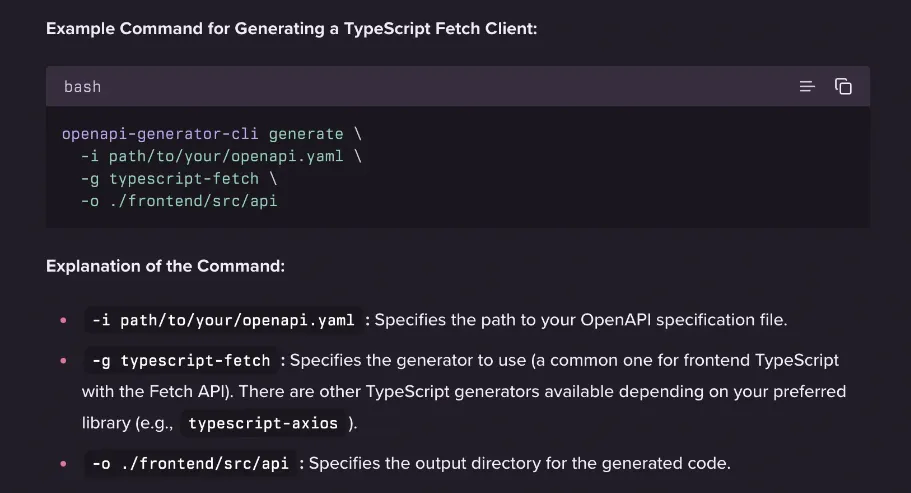
Using the openapi-generator-cli tool can help you create fullstack type safety from an openapi yaml.
Creating Swagger docs
Using a swagger SDK in your backend allows you to set up swagger document from an openapi yaml file.
import express from 'express';
import swaggerUi from 'swagger-ui-express';
import fs from 'fs';
import YAML from 'yaml';

const app = express();
app.use(express.json());

const openapiPath = './openapi.yaml';
const file = fs.readFileSync(openapiPath, 'utf8');
const swaggerDocument = YAML.parse(file);

app.use('/api-docs', swaggerUi.serve, swaggerUi.setup(swaggerDocument));

// ... your other API routes ...

app.listen(3000, () => {
  console.log('Backend listening on port 3000');
  console.log('Swagger UI available at http://localhost:3000/api-docs');
});
TRPC
trpc is a tool that kind of works liek server actions in NextJS: it provides type safety across the frontend and backend when dealing with API requests and AJAX fetching, and has pros and benefits for its use:
| pros | cons |
|---|---|
| great for when working on small to medium projects | not good at large scale |
| great for when using typescript across the codebase | not good when dealing with many 3rd party libraries or languages. |
| great for when not many libraries | not good if you want a public facing API |
| TRPC is the best when you are building a fullstack app and want speed, type-safety, and are working with TypeScript. It's not a good choice for building a public API since you would want REST or GraphQL for that. |
basic flow
There are three main steps when setting up TRPC:
- connect TRPC to a server, like express, nextjs, or normal http server through an adapter
- create TRPC methods that will be exposed to the client through a TRPC router.
- use the TRPC methods on the frontend
Context setup
context in TRPC is a way to pass the same global variables and access them on all TRPC routes. Some useful things to put in context would be databases, the current user auth, etc.
- The context must be a function that returns data
export async function createContext() {
  /**
   * In this function, you return the global context you want each route to have access to. In a real world example, return your database ORM here
   */

  return {
    dogsData: [
      {
        name: "Rex",
        age: 3,
      },
    ],
  };
}

type Context = Awaited<ReturnType<typeof createContext>>;
TRPC router setup
The first step is to create the procedure from the context. By default, we create a public procedure, which means there is no middleware running before it.
import { initTRPC } from "@trpc/server";
import { z } from "zod";
// Initialize tRPC with context
const t = initTRPC.context<Context>().create();

// Create router and procedure helpers
export const router = t.router;
export const publicProcedure = t.procedure;
The second step is to create a TRPC router where you expose methods of two types:
- queries: correspond to GET routes
- mutations: correspond to all other routes, like updating, deleting, posting
Both queries and mutations get access to the context, so they work the same but are named different for semantic purposes.
you create TRPC routes through these three basic methods on a procedure:
procedure.input(zodtype): Use this method when you need request body parameters to request the route, validating the body through a zod schema. You can then access the strongly-typed parameters when querying.procedure.query({input, context}): the actual TRPC route handler that gains access to the context and input (only if specified beforehand). In this handler, you simply return whatever data you want.procedure.mutate({input, context}): the actual TRPC route handler that gains access to the context and input (only if specified beforehand). In this handler, you mutate data and then return whatever data you want.
export const dogRouter = router({
  // GET /dogs - return all dogs
  getDogs : publicProcedure.query(({ ctx }) => {
    return ctx.dogsData;
  }),
  // GET /dogs/:name - return single dog
  getDogByName: publicProcedure
    .input(z.object({ name: z.string() }))
    .query(({ input, ctx }) => {
      return ctx.dogsData.find((dog) => dog.name === input.name);
    }),
  // POST /dogs - add new dog
  addDog: publicProcedure
			  .input(z.object({
				  name: z.string(),
				  age: z.number(),
				}))
			  .mutation(({ input, ctx }) => {
			    ctx.dogsData.push(input); // pushes {name: string, age: number}
			    return { success: true };
			  })
});
The third step is to create the app router that you can then expose as middleware on a HTTP server. You also create a type definition of the API that the client can use to get complete type safety.
// Create the app router
export const appRouter = router({
  dog: dogRouter,
});

// Export type definition of API for client usage
export type AppRouter = typeof appRouter;
connecting TRPC to express
TRPC has several adapters for converting its router into middleware that can be used by popular backend frameworks like express, NextJS, and custom HTTP servers.
Here is the custom adapter that turns a TRPC router into express middleware.
import { createExpressMiddleware } from "@trpc/server/adapters/express";
import express from "express";
import { appRouter, createContext } from "./trpcRouter";

/**
 * Creates an Express router with tRPC endpoints
 * @returns Express router with tRPC middleware
 */
export function createTRPCRouter() {
  const router = express.Router();

  router.use(
    createExpressMiddleware({
      router: appRouter,
      createContext,
    })
  );

  return router;
}
Then the only thing left to do is to use this middleware at the app level, scoping it to a route if you want:
import { createTRPCRouter } from "./trpc/trpcAdapter";
import express from "express"

// ...
const app = express()
app.use("/api/trpc", createTRPCRouter());
Accessing from client
Then you can access it from the frontend like so by creating a TPRC client then doing the two important things to get end to end type safety:
- Connect the client to the backend by specifying the server url route the TRPC router runs on.
- Pass the TRPC router type to the client so you get type safety over the methods.
import { createTRPCClient, httpLink } from "@trpc/client";
import type { AppRouter } from "../trpc/trpcRouter";

const SERVER_URL = "http://localhost:4001";

const trpcClient = createTRPCClient<AppRouter>({
  links: [
    httpLink({
      url: `${SERVER_URL}/api/trpc`,
    }),
  ],
});

const dogs = await trpcClient.dog.getDogs.query();
console.log("data from /api/trpc - dogs.getDogs", dogs);
Routers and procedures in depth
The great thing about using routers is that they are composable, meaning you can do something like this:
export const appRouter = t.router({
  getCats : publicProcedure.query(({ ctx }) => {
    return ctx.catsData;
  }),
  dogs: dogRouter // set .dogs key to the routes from dogRouter.
})
procedure output
just like you have type validation with zod for procedure.input(), you can have validation for the return value from a query or mutation using procedure.output(), passing in a zod schema. This provides extra type safety.
export const dogRouter = router({
  addDog: loggingProcedure
    .input(dogSchema)
    // validate return value from mutation against zod schema
    .output(z.object({ success: z.boolean() }))

    .mutation(({ input, ctx }) => {
      ctx.dogsData.push(input);
      return { success: true };
    }),
});
client side in depth
There are a few useful options you can do on the client side, such as log every TRPC network request, set custom headers, and more.
import {
  createTRPCClient,
  httpBatchLink,
  httpLink,
  loggerLink,
} from "@trpc/client";
import "./style.css";
import type { AppRouter } from "../trpc/trpcRouter";

const SERVER_URL = "http://localhost:4001";

const trpcClient = createTRPCClient<AppRouter>({
  links: [
    loggerLink(),
    httpLink({
      url: `${SERVER_URL}/api/trpc`,
      // set headers
      headers: ({ op }) => {
        const { path, type, input, context, id, signal } = op;
        console.log(op);
        return {
          "x-trpc-source": "frontend",
          "x-trpc-operation": `${path}.${type}`,
        };
      },
    }),
  ],
});
WARNING
The logger link must always be first, because it works like middleware - run in order.
class abstraction
Here's a small class abstraction for the server, which doesn't do much, but it simplifies code:
import { initTRPC } from "@trpc/server";
import { createExpressMiddleware } from "@trpc/server/adapters/express";
import express from "express";

export class TRPCServerModel<T extends object> {
  public t: ReturnType<ReturnType<typeof initTRPC.context<T>>["create"]>;
  private appRouter?: ReturnType<this["router"]>;
  constructor(private createContext: () => Promise<T>) {
    // Initialize tRPC with context
    this.t = initTRPC.context<T>().create();
  }

  public get publicProcedure() {
    return this.t.procedure;
  }

  public get router() {
    return this.t.router;
  }

  public setAppRouter(appRouter: ReturnType<this["router"]>) {
    this.appRouter = appRouter;
  }

  createExpressRouter() {
    if (!this.appRouter) {
      throw new Error("App router not initialized");
    }
    const router = express.Router();

    router.use(
      //@ts-ignore
      createExpressMiddleware({
        router: this.appRouter,
        createContext: this.createContext,
      })
    );

    return router;
  }
}
Then you would do all your setup in a different trpcSetup.ts:
import { TRPCServerModel } from "./TRPCServerModel";

// 1. create context
export const trpcServer = new TRPCServerModel(async () => {
  return {
    dogsData: [
      {
        name: "Rex",
        age: 3,
      },
    ],
  };
});

// example of creating a middleware
const loggingProcedure = trpcServer.publicProcedure.use(async (opts) => {
  const { path, type, input, ctx, next, meta, signal } = opts;
  console.log(opts);
  return next({
    ctx,
    input,
  });
});

// 3. create routers
const dogsRouter = trpcServer.router({
  getDogs: loggingProcedure.query(({ ctx }) => {
    return ctx.dogsData;
  }),
});

const newAppRouter = trpcServer.router({
  dogs: dogsRouter,
});

// 4. set app router
trpcServer.setAppRouter(newAppRouter);

// 5. export app router type
export type NewAppRouter = typeof newAppRouter;
Then in your server.ts, you would create the express router and scope it to a route:
import { trpcServer } from "./trpc/newTRPCThing";

// ...

app.use("/api/trpc", trpcServer.createExpressRouter());
Then on the client, you have a super simple abstraction:
import {
  createTRPCClient,
  httpBatchLink,
  httpLink,
  loggerLink,
  httpSubscriptionLink,
  splitLink,
  TRPCClient,
} from "@trpc/client";
import { AnyTRPCRouter } from "@trpc/server";

export function initClient<T extends any>(serverUrl: string) {
  const trpcClient = createTRPCClient({
    links: [
      loggerLink(),
      splitLink({
        // uses the httpSubscriptionLink for subscriptions
        condition: (op) => op.type === "subscription",
        true: httpSubscriptionLink({
          url: serverUrl,
        }),
        false: httpLink({
          url: serverUrl,
        }),
      }),
    ],
  });
  return trpcClient as TRPCClient<T extends AnyTRPCRouter ? T : never>;
}
And you can use it like so:
const trpcClient = initClient<NewAppRouter>("http://localhost:4001/api/trpc");

const dogs = await trpcClient.dogs.getDogs.query();
console.log("data from /api/trpc - dogs.getDogs", dogs);
using with react
You can use TPRC with react query to implement caching, deduplication, etc. with tprc:
The first step is to create the TPRC client for react query:
import { createTRPCReact } from '@trpc/react-query';
import type { AppRouter } from '../backend/router';

export const trpc = createTRPCReact<AppRouter>();
You then connect that client to react query through creating a provider:`
import { QueryClient, QueryClientProvider } from '@tanstack/react-query';
import { httpBatchLink } from '@trpc/client';
import { trpc } from './trpc';

const queryClient = new QueryClient();

export const TRPCClientProvider: React.FC<{ children: React.ReactNode }> = ({ children }) => {
  const [trpcClient] = useState(() =>
    trpc.createClient({
      links: [
        httpBatchLink({
          url: 'http://localhost:3000/trpc', // Replace with your backend URL
        }),
      ],
    }),
  );
  return (
    <trpc.Provider client={trpcClient} queryClient={queryClient}>
      <QueryClientProvider client={queryClient}>{children}</QueryClientProvider>
    </trpc.Provider>
  );
};
ReactDOM.render(
  <TRPCClientProvider>
    <App />
  </TRPCClientProvider>,
  document.getElementById('root'),
);
you then get full access to using the tprc client in a react query way:
import React, { useState } from 'react';
import ReactDOM from 'react-dom';
import {TRPCClientProvider} from "./TPRCClientProvider.tsx"


const App: React.FC = () => {
  const helloQuery = trpc.hello.useQuery({ name: 'tRPC user' });
  const [messageText, setMessageText] = useState('');
  const createMessageMutation = trpc.createMessage.useMutation();

  const handleCreateMessage = async () => {
    try {
      await createMessageMutation.mutateAsync({ text: messageText });
      setMessageText('');
      alert('Message sent successfully!');
    } catch (error) {
      console.error('Error creating message:', error);
      alert('Failed to send message.');
    }
  };

  return (
    <div>
      <h1>tRPC Example</h1>
      {helloQuery.isLoading ? (
        <div>Loading...</div>
      ) : (
        <div>{helloQuery.data?.greeting}</div>
      )}

      <h2>Create Message</h2>
      <input
        type="text"
        value={messageText}
        onChange={(e) => setMessageText(e.target.value)}
        placeholder="Enter your message"
      />
      <button onClick={handleCreateMessage} disabled={createMessageMutation.isLoading}>
        {createMessageMutation.isLoading ? 'Sending...' : 'Send Message'}
      </button>
    </div>
  );
};
middleware
Middleware in TRPC works by creating a procedure that uses it, and then using that procedure in queries and mutations, therefore applying the middleware.
- Create a middleware with
t.middleware()
const middleware = t.middleware(({ ctx, next }) => {
  // do stuff like throwing errors, augmenting context, etc.

  // go to next middleware
  return next({ ...ctx });
});
- Create a procedure from
t.procedureor another existing procedure withprocedure.use
const procedureWithMiddleware = t.procedure.use(middleware);
- Use the procedure for queries and mutations
export const trpcRouter = router({
  getDogs: procedureWithMiddleware.query(({ ctx }) => {
    return ctx.dogsData;
  }),
});
example 1: authentication
You can model an auth middleware by creating a middleware that checks if a user variable lives on the context.
- If not authenticated, throw a trpc error
- if authenticated, go the next middleware with
next(), passing in new context
import { TRPCError } from '@trpc/server';

const isAuthed = t.middleware(({ ctx, next }) => {
  // do code to fetch user token ...
  if (!ctx.user) throw new TRPCError({ code: 'UNAUTHORIZED' });
  return next({ ctx: { user: ctx.user } }); // now user is non-null
});

export const protectedProcedure = t.procedure.use(isAuthed);
example 2: logging middleware
you can create a procedure that simply runs something before going to the next route handler query or mutation.
// Initialize tRPC with context
const t = initTRPC.context<Context>().create();

// Create router and procedure helpers
export const router = t.router;
export const publicProcedure = t.procedure;

const loggingMiddleware = t.middleware(
  async ({ path, type, next, input, ctx }) => {
    console.log(`middleware: ${path} ${type} ${JSON.stringify(input)}`);
    return next({
      ctx,
      input,
    });
  }
);
const loggingProcedure = t.procedure.use(loggingMiddleware);
you would then continue to use the new procedure in the router:
export const dogRouter = router({
  getDogs: loggingProcedure.query(({ ctx }) => {
    return ctx.dogsData;
  }),
  addDog: loggingProcedure.input(dogSchema).mutation(({ input, ctx }) => {
    ctx.dogsData.push(input);
    return { success: true };
  }),
});
Middleware in depth
A classic middleware is created through a procedure.use(middlewareFunc) method, allowing for composable middlewares that use other middlewares before it.
const t = initTRPC.context<Context>().create();

export const router = t.router;
export const publicProcedure = t.procedure;
On a middleware, you can access a bunch of information:
- route handler type: the type of the TRPC route handler, whether it is a query, mutation, or subscription
- input: the input, if there is any, to the route handler
- context: the context
- path: the specific TRPC route being called
const loggingProcedure = publicProcedure.use(async (opts) => {
  const { path, type, input, ctx, next, meta, signal } = opts;
  console.log(opts);
  return next({
    ctx: ..., // the new context to pass
    input: ..., // the new input to pass
  });
});
On most middleware, you'll want to call next() to continue going to the route handler to finish the request/response cycle. You must pass the context and input to the next() function.
subscriptions
Subscriptions in TPRC take a lot of work to get done. On the backend, you create a subscription through an async generator, and on the frontend, you consume it through an abstraction masking websockets or server sent events.
creating subscriptions from backend
To create a subscription method on the TPRC router, you need an event emitter and you need to asynchronously consume an event from that event emitter. You create TRPC subscription routes using the procedure.subscription() method, and then passing in an async generator function.
The on() function is a utility to convert an event emitter listener into an async generator function you can consume, which is exactly what we need. Here is an example of how to use it:
import {on, EventEmitter} from "node:events"

const eventEmitter = new EventEmitter()

const controller = new AbortController()

for await (const data of on(eventEmitter, "newData", controller.signal)) {
	// do stuff with data
}
A common practice for subscriptions to is to subscribe to mutations so you can update the UI accordingly in the frontend whenever data changes. Here is what we do in the router to set up subscription logic:
- In the mutation route, emit an event
- In the subscription route, create an async generator function that has access to the context, input, and an abort signal (for handling when the client unsubscribes).
export const dogRouter = router({
  addDog: publicProcedure
    .input(dogSchema)
    .output(z.object({ success: z.boolean() }))
    .mutation(({ input, ctx }) => {
      ctx.dogsData.push(input);
      // 1) emit event
      eventEmitter.emit("dog-added", input);
      return { success: true };
    }),
  onNewDog: publicProcedure.subscription(async function* onNewDog(opts) {
    // 2) gain access to useful globals
    const { ctx, input, signal } = opts;

    try {
      // 3) asynchronously consume event
      for await (const data of eventEmitter.consumeEventStream(
        "dog-added",
        signal
      )) {
        // 4) pass data to frontend by yielding it
        yield data;
      }
    } catch (error) {
      // 5) gracefully catch abort errors
      if (signal?.aborted) {
        console.log("subscription aborted");
        return;
      }
      console.error("Error occurred:", error);
    }
  }),
});
Setting subscription on client
To setup the subscription on the client side, we need to use a special server-sent event route with TRPC:
- Use the
splitLink()function to split links into using thehttpSubscriptionLink()for subscription routes, or justhttpLink()for normal query or mutation routes.
import {
  createTRPCClient,
  httpBatchLink,
  httpLink,
  loggerLink,
  httpSubscriptionLink,
  splitLink,
} from "@trpc/client";
import "./style.css";
import type { AppRouter } from "../trpc/trpcRouter";

const SERVER_URL = "http://localhost:4001";

const trpcClient = createTRPCClient<AppRouter>({
  links: [
    loggerLink(),
    splitLink({
      // uses the httpSubscriptionLink for subscriptions
      "condition": (op) => op.type === "subscription",
      "true": httpSubscriptionLink({
        url: `${SERVER_URL}/api/trpc`,
      }),
      "false": httpLink({
        url: `${SERVER_URL}/api/trpc`,
      }),
    }),
  ],
});
You can then create a subscription with the .subscribe() method, which returns a connection object. You can pass in an input if necessary, but otherwise, what's important is the object of callbacks that let you hook into the lifecycle of the subscription:
onData(data): whenever data is yielded, you get access to it here and you can run a callbackonError(error): whenever an error occurs, this callback runsonComplete(): this callback runs when you callconnection.unsubscribe()
const connection = trpcClient.dog.onNewDog.subscribe(undefined, {
  // runs when new data is received
  onData: (data) => {
    console.log("onNewDog", data);
  },
  // runs when error occurs
  onError: (error) => {
    console.error("onNewDog", error);
  },
  // run when you call connection.unsubscribe()
  onComplete: () => {
    console.log("onNewDog complete");
  },
});


trpcClient.dog.addDog.mutate({ name: "Rex 1", age: 3 });

connection.unsubscribe() // aborts the signal in the backend
unsubscribing from the client
When you get the connection object returned from the subscription, you can call connection.unsubscribe() which does two things:
- Invokes the
onComplete()callback in the client - Aborts the signal on the server in the async generator function in the subscription procedure, meaning you have to gracefully handle that to prevent your app from crashing.
unsubscribing from the server
You can stop the subscription from the serveer simply by stopping the async generator. This just means returning instead of yielding:
import { publicProcedure, router } from '../trpc';
export const subRouter = router({
  onPostAdd: publicProcedure
    .input(
      z.object({
        lastEventId: z.string().coerce.number().min(0).optional(),
      }),
    )
    .subscription(async function* (opts) {
      let index = opts.input.lastEventId ?? 0;
      while (true) {
        const idx = index++;
        if (idx > 100) {
          // With this, the subscription will stop and the client will disconnect
          return;
        }
        await new Promise((resolve) => setTimeout(resolve, 10));
      }
    }
  }),
});
Other adapters
Custom adapter
The most custom adapter is to create a standalone separate HTTP server running on a specific port with the sole purpose of running TRPC:
import { createHTTPServer } from "npm:@trpc/server/adapters/standalone";
const server = createHTTPServer({
  router: appRouter,
  createContext: () => {},
});
server.listen(3000);