complete-express-guide
Express basics
This is how you create a basic express app:
import express from "express";

// 1. create express app
const app = express();

// 2. setup routes
app.get("/", async (req, res) => {
  res.send("hello");
});

// 3. listen
const port = 3000;
const serverUrl = `http://localhost:${port}`;
app.listen(port, () => {
  console.log(`Server running on ${serverUrl}`);
});
Common middleware
Whenever you use express, there are common middlewares you pretty much always use, and you register a middleware at the app level with app.use(), and you can specify a route to scope the middleware to by supplying the route as the first parameter.
// 1. estabslih cors
app.use(cors());
// 2. serve all content from folder statically at /frontend route
app.use("/frontend", express.static(path.join(__dirname, "frontend")));
// 3. allow for json request bodies
app.use(express.json())
// 4. parse form data
app.use(express.urlencoded({ extended: true }));
Let's go through them one by one:
cors middleware
This middleware enables CORS for your server, allowing frontend apps you specify to request API endpoints from your server via AJAX calls.
app.use(cors())
NOTE
By default, this middleware allows all origins to access the server.
static middleware
This middleware serves content statically from a directory, and you can scope it to a specific route. For example, lets say you have this frontend folder structure:
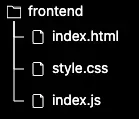
You can serve all content from this folder statically with this code, scoping it under the /app/content route:
app.use("/app/content", express.static(path.join(__dirname, "frontend")));
This means you would now access those assets based on the scoped route, like /app/content/style.css to access the css.
WARNING
It is extremely important to remember that all filepath code breaks if you're running the process in a different directory than expected, so to remediate this, always failsafe your code with __dirname and path.join()
body parsing middleware
Express is old, so it requires middleware to parse request bodies correctly. Just use these middleware to parse JSON and FormData bodies:
app.use(express.json())
app.use(express.urlencoded({ extended: true }));
Routers
You can use routers to organize your routes into different files. Note that routes are matched in order from top to bottom.
const express = require("express");
const userRouter = express.Router();

// matches route from top to bottom. Keep fixed routes up top.
userRouter.get("/login", (req, res) => {
  res.send("you logged in.");
});

module.exports = { userRouter }
You then use the router like a middleware, being able to scope it to a route:
import { userRouter } from "./userRouter.ts"
import express from "express"

const app = express()
app.use("/auth", userRouter) // now login at /auth/login
Guide to middleware
Basics
Middleware in express is the industry-standard that has been copied across other frameworks. It's simple to understand: every route handler also gets access to a next() function that when invoked, goes to the next middleware/route handler.
const cb0 = function (req, res, next) {
  console.log('CB0')
  next()
}

const cb1 = function (req, res, next) {
  console.log('CB1')
  next()
}

const cb2 = function (req, res) {
  res.send('Hello from C!')
}

// will log CB0, CB1, before sending response
app.get('/example/c', [cb0, cb1, cb2])
There are three basic ways to use middleware:
- method 1 - global middleware: This method involves passing the middleware to
app.use()which will then run the middleware at the root level. - method 2 - scoped middleware: This method involves passing the middleware to
app.use()but then scoping it to a route by passing in the route as the first parameter.app.use("/frontend", someMiddleware())will only run the middleware on the/frontendlevel root and anything below that.
- method 3 - middleware on a request/response cycle: You can have middleware run before specific route handlers by putting them in an array before the actual route handler callback.
Error handling
Your app architecture will benefit from throwing custom errors so you know exactly what went wrong in your code.
// errors.ts
export enum ErrorCode {
  NOT_FOUND = 'NOT_FOUND',
  VALIDATION_ERROR = 'VALIDATION_ERROR',
  UNAUTHORIZED = 'UNAUTHORIZED',
  FORBIDDEN = 'FORBIDDEN',
  INTERNAL_ERROR = 'INTERNAL_ERROR',
  DATABASE_ERROR = 'DATABASE_ERROR',
}

export interface ErrorResponse {
  error: {
    message: string;
    code: ErrorCode;
    details?: unknown;
  };
}

export class AppError extends Error {
  statusCode: number;
  code: ErrorCode;
  details?: unknown;

  constructor(message: string, code: ErrorCode, statusCode: number, details?: unknown) {
    super(message);
    this.name = 'AppError';
    this.code = code;
    this.statusCode = statusCode;
    this.details = details;
  }
}

export class NotFoundError extends AppError {
  constructor(message = 'Resource not found', details?: unknown) {
    super(message, ErrorCode.NOT_FOUND, 404, details);
    this.name = 'NotFoundError';
  }
}

export class ValidationError extends AppError {
  constructor(message = 'Validation failed', details?: unknown) {
    super(message, ErrorCode.VALIDATION_ERROR, 400, details);
    this.name = 'ValidationError';
  }
}

// Additional error classes…
Dealing with cookies
Use the cookieParser() 3rd party middleware in express to deal with cookies:
import cookieParser from 'cookie-parser';

// Setup cookie parser

app.use(cookieParser());

// Define expected cookies

interface AuthCookies {
  sessionId?: string;
}

// Create a middleware to validate required cookies

function requireCookie(cookieName: string) {
  return (req: Request, res: Response, next: NextFunction) => {
    if (!req.cookies?.[cookieName]) {
      return res.status(400).json({
        error: `Missing required cookie: ${cookieName}`,
      });
    }

    next();
  };
}

// Use it in routes

app.get('/dashboard', requireCookie('sessionId'), (req: Request, res: Response) => {
  // Safe to assert this cookie exists

  const sessionId = req.cookies.sessionId as string;

  // Use the session ID

  // …

  res.send('Dashboard');
});

// Setting cookies

app.post('/login', (req: Request, res: Response) => {
  // Authentication logic

  // …

  // Set cookie

  res.cookie('sessionId', 'abc123', {
    httpOnly: true,

    secure: process.env.NODE_ENV === 'production',

    maxAge: 24 * 60 * 60 * 1000, // 24 hours
  });

  res.json({ success: true });
});
Data Persistence
Here are some basic ways to have data persistence in your server across its lifetime:
res.locals: an obejct that persists during the request/response cycle, and gets deleted after a response is sent.app.locals: An object that persists throughout the entire lifetime of the application, basically as long as the server is running.res.app.locals: a way to accessapp.localsfrom middleware.
To have data persistence throughout the request/response cycle, you can store properties on the req object, augmenting it as you desire.