data-validation
Zod
Zod is a schema-based way of doing type-inference and checking at runtime while also getting TS compiler hints that make for a good dev experience.
Basics
previously to check if something was a user, you would have to run typescript type guards like this:
// Runtime type checking can impact performance
function validateUser(data: unknown): User {
  if (
    typeof data !== 'object' ||
    data === null ||
    !('username' in data) ||
    !('email' in data) ||
    typeof data.username !== 'string' ||
    typeof data.email !== 'string'
  ) {
    throw new ValidationError('Invalid user data');
  }

  return data as User;
}
But with Zod, you reduce that unwieldiness to a more flexible form:
import { z } from "zod";

const userSchema = z.object({
  name: z.string(),
  age: z.number(),
});

// simple type guard
function isUser(user: unknown): user is z.infer<typeof userSchema> {
  return userSchema.safeParse(user).success;
}

// parse that throws error
function validateUser(user: unknown) {
  return userSchema.parse(user);
}

// succeeds
const user = validateUser({ name: "John", age: 30 });
console.log(user);

// fails
const user2 = validateUser({ name: "John", age: "30" });
console.log(user2);
The basic flow of using zod is to first create a schema, and then use that schema to validate objects of an unknown type. You have two paths to do so:
- parsing: throws an error if the value does not fit the schema
- safe parsing: does not throw an error, only returns a boolean telling whether or not the value fits the schema.
But after validation, you will get back the object with typescript type inference both at runtime and compile time, offering great dx.
z.infer<typeof someSchema>: a custom generic typing that zod provides to extract the base type that a schema describes, reducing code duplication.schema.parse(value): parses the value and returns it if it passes, throws an error if it does not fit the schema.schema.safeParse(value): returns asuccessproperty you can access that tells you whether or not the obejct you passed in fit the schema.
We can generalize this pattern for any schema using generics
function isOfType<T>(value: unknown, schema: z.ZodType<T>): value is T {
  return schema.safeParse(value).success;
}

const user3 = { name: "John", age: 30 };
const user4 = { name: "John", age: "30" };

console.log(isOfType(user3, userSchema));
console.log(isOfType(user4, userSchema));

function validateSchema<T>(value: unknown, schema: z.ZodType<T>) {
  return schema.parse(value);
}

const user5 = { name: "John", age: 30 };
const user6 = { name: "John", age: "30" };

console.log(validateSchema(user5, userSchema));
console.log(validateSchema(user6, userSchema));
You can use the below class for general validation:
export class Validation<T> {
  constructor(public schema: z.ZodType<T>) {}

  isOfType(value: unknown): value is T {
    return this.schema.safeParse(value).success;
  }

  validateSchema(value: unknown) {
    return this.schema.parse(value);
  }
}
Then I use it in an example:
const dogSchema = z.object({
  name: z.string(),
  breed: z.enum(["labador", "weenie"]),
});

const dogValidator = new Validation(dogSchema);
console.log(
  dogValidator.isOfType({
    name: "brah",
    breed: "labador",
  })
);
z.infer<T>
The z.infer<T> generic type takes in a zod object type and returns the inferred type structure that the schema specifies, which gives you a handy way to create a typescript interface derived from the schema structure. This has two main benefits:
- Keeps types and schemas in sync
- Reduces code duplication (no need for separate typescript types, just derive them from zod.)
import { z } from 'zod';

export const UserSchema = z.object({
  name: z.string().min(1, "Name can't be empty"),
  email: z.email('Invalid email format'),
  age: z.number().int().min(1).max(120),
});

// Automatically infer the TypeScript type
export type UserType = z.infer<typeof UserSchema>;
zod types
Zod types include objects, arrays, and primitives. For all purposes, zod types mean using any z.object(), z.array(), or any other zod primitive type.
primitive zod types
It's important to understand a few primitive zod types:
z.number(): a number typez.string(): a string typez.date(): aDatetypez.boolean(): a boolean typez.undefined(): a undefined typez.null(): a null type
Special string zod types
Here are some special stirng zod types because they represent common types of validation:
z.email(): email validationz.uuid(): uuid validationz.url(): url validationz.literal(str): specifies a string type that can only be the literal string value you pass in.
object zod types
You can build any schema based off the z.object() type which represents a javascript object where the keys should have values that are primitive zod types.
const userSchema = z.object({
  name: z.string(),
  email: z.string(),
  age: z.number()
});
array zod types
You can create array types in zod with the z.array() method and then passing in any zod type. You can basically pass in anything:
const strArray = z.array(z.string())
const dogArray = z.array(z.object({
    name: z.string(),
    breed: z.string(),
    age: z.number().gt(0).lt(30)
}))
Modifiers
You can use modifiers which chain on primitive types to give more type checking at runtime, such as email check, strong password check, number value checking, etc., which is all invaluable stuff to have at runtime.
The most basic modifier is z.optional(), but there are others
// create user schema with optional age, and email 6-40 chars long
const userSchema = z.object({
  name: z.string(),
  email: z.string().min(6).max(40),
  age: z.number().optional()
});
universal modifiers
these modifiers are universal and can be used on any primitive type:
z.optional(): makes the value optionalz.nullable(): makes the value able to be equal tonullz.nullish(): makes the value able to be equal tonullorundefinedz.default(value): provides a default value if a value is not provided. This only makes sense when combined withz.optional()z.literal(value): forces the value to be typed literally, as if usingas const
Type branding: string modifiers
These modifiers chain onto a z.string() instance:
z.brand<T>(): used for type branding, when you want typescript to infer your string type as a literal.
Zod has a concept of “branded” types, letting you layer on custom brand markers to differentiate otherwise identical primitives. This is great if you want to give a type special meaning without creating a new runtime type. For instance, you can have a UserId that’s just a string under the hood but is recognized as a distinct brand in your code:
const hexColorSchema = z
  .string()
  .regex(/^#([0-9a-fA-F]{6})$/)
  .brand<HexColor>();

const hexColor = hexColorSchema.parse("#123456");
const userIdSchema = z.string().uuid().brand<'UserId'>();

type UserId = z.infer<typeof userIdSchema>; // string & { __brand: "UserId" }

const userId = userIdSchema.parse('7c45ae8a-cf6e-4f72-b12f-6fbb21ce3ab9'); // works
userIdSchema.parse('not-a-uuid'); // throws ZodError
import { z } from 'zod';

const emailSchema = z.string().email().brand<'EmailAddress'>();

type EmailAddress = z.infer<typeof emailSchema>;
// => string & { __brand: "EmailAddress" }

const email = emailSchema.parse('test@example.com');
// Type is EmailAddress

function sendEmail(to: EmailAddress) {
  console.log('Sending email to', to);
}

sendEmail(email);
// Works

sendEmail('unbranded string');
// Type error: not EmailAddress
Array modifiers
These modifiers chain onto a z.array() instance:
z.nonempty(): ensures that the array has at least one element.
Object modifiers
There are some modifiers that apply to z.object() types:
z.partial(): makes all properties in the object optional (useful for updating)z.pick(object): returns only the specified keys, where you specify which ones you want is aRecord<keyof schema, true>key value pairz.omit(object): omits only the specified keys, where you specify which ones you want is aRecord<keyof schema, true>key value pair
Here is how these work:
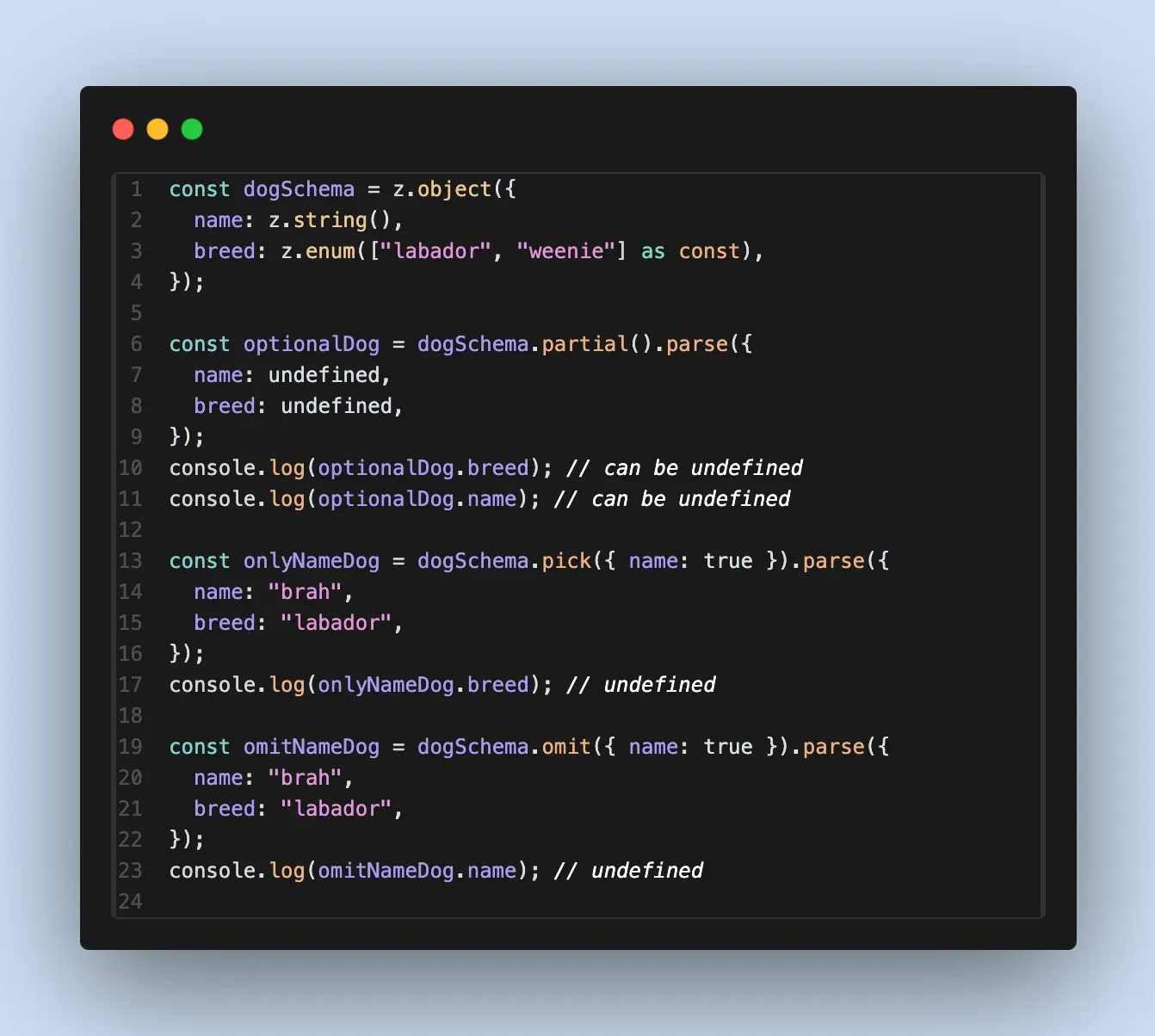
extending schema
With the z.merge() and z.extend() modifiers, both which act on object schemas and take in additional object schemas as arguments, you can create new schemas from other object schemas.
NOTE
Extending and merging do the same thing. The only difference is that they take in different arguments:
merge() takes in a zod object schema while extend() takes in a javascript object.
Extending works by taking in a simple object of properties to add onto the schema, not a separate schema.
const dogSchema = z.object({
  name: z.string(),
});

const tinyDogSchema = dogSchema.extend({
  tiny: z.literal(true),
});

const { name, tiny } = tinyDogSchema.parse({});
Merging works by taking in a zod object schema to merge into, making an entirely new schema:
const catSchema = z.object({
  name: z.string(),
  meows: z.literal(true),
});

const dogOrCatSchema = dogSchema.merge(catSchema);
const {meows, name} = dogOrCatSchema.parse({});
Zod modes
There are three main modes in zod when it deals with the concept of duck typing and how to deal with objects that fit the schema but have have extra properties:
- strip mode (default): If an object that fits the schema also has extra properties, Zod will automatically transform it to strip those extra properties so that the returned object EXACTLY fits the schema
- passthrough mode: If an object that fits the schema also has extra properties, Zod will let the object keep those properties. This is useful for being permissive and for doing debugging.
- strict mode: If an object that fits the schema also has extra properties, Zod will interpret that as failing the schema and will throw an error.
const baseObj = z.object({ name: z.string() });

// Strict
const strictObj = baseObj.strict();
strictObj.parse({ name: 'Zod', age: 99 });
// => throws: unrecognized key "age"

// Passthrough
const passObj = baseObj.passthrough();
passObj.parse({ name: 'Zod', age: 99 });
// => { name: "Zod", age: 99 }

// Default (strip)
baseObj.parse({ name: 'Zod', age: 99 });
// => { name: "Zod" } (age is stripped out)
NOTE
To remember it better, you can think about these modes from least permissive to most permissive:
- strict (least permissive) -> strip (default) -> passthrough (most permissive)
Transforms, coerce, and preprocessing
Transforms work to ensure that a variable fits a zod schema first, and after it does so, it runs additional transformations on that value using z.transform(). This is useful for reusable pipelines:
import { z } from "npm:zod";

const stringToDateSchema = z.string().transform((val) => {
  try {
    return new Date(val);
  } catch (e) {
    throw e
  }
});

const date = stringToDateSchema.parse("2025-05-25");
console.log(date);
In the example above, we approached the difficult problem of determining whether or not a string represents a valid date string by first ensuring it was a string, and then trying to transform it into a Date object in javascript with z.transform():
- If transformation works, then date string was valid
- If transformation fails, throw an error
coercing
If you don't want to go through the hassle of writing a custom transform and instead just want to force an input to be a certain type, you can use the z.coerce.<type> modifier, of which there are three types:
z.coerce.boolean(val): schema that casts the passed in value to a boolean.z.coerce.date(val): schema that casts the passed in value to a date.z.coerce.number(val): schema that casts the passed in value to a number.
This is how we can rewrite the above example in less code to check if a string represents a date, and if so, convert it to a date else throw an error.
const stringToDateSchema = z.string().pipe(z.coerce.date());

const date = stringToDateSchema.parse("2025-05-25"); // "dog" would fail
console.log(date);
NOTE
If you pass in a value into z.coerce() that cannot be coerced at all (zod tries its hardest), then it would throw an error.
preprocessing
z.preprocess(fn: (input: unknown) => unknown, schema: ZodSchema) applies a preprocessing function before validation. Useful for cleaning up or transforming input data before it’s validated against the core schema.
const preprocessNumberSchema = z.preprocess((val) => {
  if (typeof val === 'string') {
    return parseInt(val, 10); // Try to parse string to number
  }
  return val; // Otherwise, return original value
}, z.number().positive());

preprocessNumberSchema.parse('42'); // Valid, returns 42 (number)
preprocessNumberSchema.parse(42); // Valid, returns 42 (number)
// preprocessNumberSchema.parse("abc"); // Throws ZodError (after preprocessing): Expected number, received nan
Keeping these validations separate from the raw schema logic keeps your code cleaner and more manageable.
Miscellaneous Zod types
Enums, unions, tuples, intersections
you can create an enum like so to create union literal typing like so:
const dogSchema = z.object({
  breed: z.enum(["labador", "weenie"] as const),
});
You can create a tuple with z.tuple() and then pass in an array of zod types:
const coords = z.tuple([z.number(), z.number(), z.number()]) // x,y,x
You can create a union type with z.union() type which takes in an array of zod types:
const stringOrNumber = z.union([z.string(), z.number()])
Intersections are basically the same thing as merging schemas, but can be applied to all zod types, not just objects. You use them with the z.intersect() method:
const stringSchema = z.object({ a: z.string() });
const numberSchema = z.object({ b: z.number() });
const intersectionSchema = z.intersection(stringSchema, numberSchema);
Discriminated unions
When your data has a known “discriminator” field, z.discriminatedUnion() is more efficient (and more explicit) than normal unions.
here are the benefits:
- Performance: Zod can skip checking every union branch once it sees the discriminator.
- Clarity: If your input object’s
typeorkindis incorrect, you’ll get an immediate error.
import { z } from 'zod';

const customerSchema = z.object({
  type: z.literal('customer'),
  orders: z.array(z.string()),
});

const adminSchema = z.object({
  type: z.literal('admin'),
  permissions: z.array(z.string()),
});

const userSchema = z.discriminatedUnion('type', [customerSchema, adminSchema]);

// Succeeds if type === 'customer' or 'admin'
userSchema.parse({
  type: 'customer',
  orders: ['order1', 'order2'],
});
records, maps
Records in zod have a string up on their TS counterparts because of the power of runtime validation and stringent requirements. You can use the z.record() method and then pass in any single zod type.
Check, for example, this record that maps user ids to their emails:
const userToEmailMap = z.record(
  z.string().min(6).max(40).endsWith("@gmail.com")
);
For a more performant solution concerning dealing with objects with an immense number of keys, you can use maps with z.map():
const stringOrNumber = z.union([z.string(), z.number()]);

const userSchema2 = z.object({
  name: z.string(),
  email: z.string(),
});
// create map of type Map<string, {name: string, email: string}>
const userIdToInfoMap = z.map(z.uuid(), userSchema2);

const map = new Map([
    ["thing", {
        email: "thing@gmail.com",
        name: "thing2"
    }]
]) as z.infer<typeof userIdToInfoMap>
Zod validation class
Here is a wrapper I wrote around some common zod functionality:
export class Validation<T extends Record<string, any>> {
  constructor(public schema: z.ZodObject<T>) {}

  createObjectWithAutocomplete(obj: T) {
    return obj;
  }

  isOfType(value: unknown): value is T {
    return this.schema.safeParse(value).success;
  }

  validateSchema(value: unknown) {
    return this.schema.parse(value);
  }

  pick(value: unknown, keys: (keyof T)[]) {
    const obj: Partial<Record<keyof T, true>> = {};
    for (let key of keys) {
      obj[key] = true;
    }
    return this.schema
      .pick(obj as unknown as Parameters<z.ZodObject<T>["pick"]>[0])
      .parse(value);
  }

  omit(value: unknown, keys: (keyof T)[]) {
    const obj: Partial<Record<keyof T, true>> = {};
    for (let key of keys) {
      obj[key] = true;
    }
    return this.schema
      .omit(obj as unknown as Parameters<z.ZodObject<T>["omit"]>[0])
      .parse(value);
  }
}
Custom validation
You can add custom validation functions with the universal z.refine() modifier, which takes in a callback with the value as a parameter and must return a boolean: true if passing, false if failing.
const userSchema2 = z.object({
  name: z.string(),
  email: z.string().refine(value => {
    return value.endsWith("braah@gmail.cp,")
  }),
});
Adding custom messages
You can add custom messages for when validation fails at certain stages, which is possible at each modifier as an optional argument.
const fancySchema = z.number().int().min(1, {
  message: 'Number must be a positive integer. This includes you, 0.',
});
Creating recursive schemas with z.lazy()
You can create recursive schemas that reference themselves by using z.lazy() and returning a self-referential schema in the callback:
const serializableSchema = z.lazy(() => {
  return z.record(
    z.string(),
    z.union([z.string(), z.number(), z.boolean(), z.null(), z.undefined(), serializableSchema])
  );
});

const parent = z.lazy(() => {
  return z.object({
    name: z.string(),
    children: z.array(parent),
  });
});
TypeScript types to zod schemas
If you want to use a typescript type or interface as a general shape for a zod schema to adhere to, then you can use these approaches:
approach 1 : use satisfies
If you are using TypeScript 4.9+, the satisfies keyword allows you to check that your schema matches your interface
import { z } from "zod";

interface User {
  id: number;
  name: string;
  email?: string;
}

const UserSchema = z.object({
  id: z.number(),
  name: z.string(),
  email: z.string().optional(),
}) satisfies z.ZodType<User>; // Ensures UserSchema produces a valid User type
approach 2: use z.ZodType<T>:
You can explicitly type your schema variable as z.ZodType<InterfaceName>. This will trigger a TypeScript error if the schema and the interface ever go out of sync.
import { z } from "zod";

interface Product {
  price: number;
  title: string;
}

// Any missing or mismatched fields here will cause a compilation error
const ProductSchema: z.ZodType<Product> = z.object({
  price: z.number(),
  title: z.string(),
});
Zod use cases
Zod with basic form validation
here is an exampel of using zod and zod errors to validate the FormData object when a form is submitted and aggregate and display errors:
import React, { useState } from 'react';
import { z } from 'zod';

const contactFormSchema = z.object({
  name: z.string().min(2),
  email: z.string().email(),
  message: z.string().min(10),
});
type ContactFormData = z.infer<typeof contactFormSchema>;

function ContactForm() {
  const [formData, setFormData] = useState<ContactFormData>({
    name: '',
    email: '',
    message: '',
  });
  const [errors, setErrors] = useState<z.ZodError<ContactFormData> | null>(
    null,
  );

  const handleSubmit = (e: React.FormEvent) => {
    e.preventDefault();
    const validationResult = contactFormSchema.safeParse(formData); // Validate form data

    if (validationResult.success) {
      console.log('Form data is valid:', validationResult.data);
      setErrors(null); // Clear errors
      // ... (Submit form data) ...
    } else {
      console.error('Form validation errors:', validationResult.error.errors);
      setErrors(validationResult.error); // Set errors to display to user
    }
  };

  const handleChange = (
    e: React.ChangeEvent<HTMLInputElement | HTMLTextAreaElement>,
  ) => {
    setFormData({ ...formData, [e.target.name]: e.target.value });
  };

  return (
    <form onSubmit={handleSubmit}>
      <div>
        <label htmlFor="name">Name:</label>
        <input
          type="text"
          id="name"
          name="name"
          value={formData.name}
          onChange={handleChange}
        />
        {errors?.formErrors
          .filter((err) => err.path[0] === 'name')
          .map((err) => (
            <p className="error">{err.message}</p>
          ))}
      </div>
      {/* ... (Email and Message fields and error display similar to Name) ... */}
      <button type="submit">Submit</button>
    </form>
  );
}
Zod with React Hook Form
This is an example of providing a zod object schema to react hook form so you can get strong typing, runtime validation, and meaningful errors:
import { useForm } from 'react-hook-form';
import { zodResolver } from '@hookform/resolvers/zod';

// 1. create a schema
const FormSchema = z.object({
  username: z.string().min(3),
  password: z.string().min(8)
});
type FormData = z.infer<typeof FormSchema>;

function MyFormComponent() {
  // 2. create the hook, passing in zod resolver
  const { register, handleSubmit, formState: { errors } } = useForm<FormData>({
    resolver: zodResolver(FormSchema)
  });

  // 3. guaranteed that all data that reaches onSubmit will be valid
  const onSubmit = (data: FormData) => {
    console.log("Valid form data:", data);
  };

  return (
    <form onSubmit={handleSubmit(onSubmit)}>
      <input {…register("username")} placeholder="Username" />
      {errors.username && <span>{errors.username.message}</span>}

      <input {…register("password")} type="password" placeholder="Password" />
      {errors.password && <span>{errors.password.message}</span>}

      <button type="submit">Sign Up</button>
    </form>
  );
}
Some bullshit
Like wtf is this AI just be cooking lowkey
/**
 * This is a file for abstractions over zod validations and parsing zod errors,
 * can be added to any package, so it is best to put this in its own "utils" package in the future
 */

import { AnyZodObject, z, ZodError, ZodIssue } from 'zod'

interface ParsedZodIssue {
  path: string
  message: string
  code: string
}

interface ParsedZodError {
  errors: ParsedZodIssue[]
}

function parseZodError(error: ZodError): ParsedZodError {
  return {
    errors: error.errors.map((issue: ZodIssue) => ({
      path: issue.path.join('.'),
      message: issue.message,
      code: issue.code,
    })),
  }
}

export class ZodValidation<T extends AnyZodObject> {
  constructor(public schema: T) {}

  createObjectWithAutocomplete(obj: z.infer<T>) {
    return obj
  }

  isOfType(value: unknown): value is z.infer<T> {
    return this.schema.safeParse(value).success
  }

  validateSchema(value: unknown) {
    return this.schema.parse(value)
  }

  validateSchemaWithAutcomplete(value: z.infer<T>) {
    return this.schema.parse(value) as z.infer<T>
  }

  pick(value: unknown, keys: (keyof z.infer<T>)[]) {
    const obj: Partial<Record<keyof z.infer<T>, true>> = {}
    for (const key of keys) {
      obj[key] = true
    }
    return this.schema
      .pick(obj as unknown as Parameters<T['pick']>[0])
      .parse(value)
  }

  omit(value: unknown, keys: (keyof z.infer<T>)[]) {
    const obj: Partial<Record<keyof z.infer<T>, true>> = {}
    for (const key of keys) {
      obj[key] = true
    }
    return this.schema
      .omit(obj as unknown as Parameters<T['omit']>[0])
      .parse(value)
  }

  static isZodError(error: unknown) {
    const isZodError =
      error instanceof ZodError ||
      (error instanceof Error && error.message.includes('ZodError'))
    return isZodError
  }

  static getZodErrorInfo(error: unknown) {
    const isZodError = this.isZodError(error)
    if (isZodError) {
      return parseZodError(error as ZodError)
    }
    if (error instanceof Error) {
      return {
        message: error.message,
      }
    }
    return null
  }
}
import {
  OpportunitySchema,
  integrationJobLockSchema,
  integrationJobSchema,
  vendorCommsJobDetailSchema,
} from '@bidscale/select-entity'
import z from 'zod'
import { ZodValidation } from './ZodValidation'

export const integrationJobValidators = {
  integrationJobErrorValidator: new ZodValidation(
    integrationJobSchema.IntegrationJobError
  ),
  opportunityDetailValidator: new ZodValidation(
    vendorCommsJobDetailSchema.PublishOpportunityDetail
  ),
}

type ParsedType<M, K extends keyof M> = M[K] extends ZodValidation<infer Schema>
  ? z.infer<Schema>
  : never

export function createQuickParser<M extends Record<string, ZodValidation<any>>>(
  validators: M
) {
  return function quickParse<K extends keyof M>(key: K, obj: ParsedType<M, K>) {
    return validators[key].validateSchemaWithAutcomplete(obj)
  }
}

export const ijParse = createQuickParser(integrationJobValidators)

export function parseOpportunity(opportunity: OpportunitySchema.Opportunity) {
  return OpportunitySchema.OpportunitySchema.parse(opportunity)
}

export function parseIntegrationJob(
  integrationJob: integrationJobSchema.IntegrationJob
) {
  return integrationJobSchema.IntegrationJobSchema.parse(integrationJob)
}

export function parseIntegrationJobLock(
  integrationJobLock: integrationJobLockSchema.IntegrationJobLock
) {
  return integrationJobLockSchema.IntegrationJobLockSchema.parse(
    integrationJobLock
  )
}