GraphQL
Basics
Why GraphQL and how it works
GraphQL is better for larger projects where you have a ton of endpoints and instead you just want to fetch the exact data you need.
Here are the core benefits of GraphQL:
- Avoid over-fetching: You avoid fetching more data than you need because you can specify the exact fields you need.
- Prevent multiple API calls: In case you need more data, you can also avoid making multiple calls to your API. In the case above, you don't need to make 2 API calls to fetch
userandaddressseparately. - Less communication overhead with API developers: Sometimes to fetch the exact data you need, especially if you need to fetch more data and want to avoid multiple API calls, you will need to ask your API developers to build a new API. With GraphQL, your work is independent of the API team! This allows you to work faster on your app.
- Self-documenting: Every GraphQL API conforms to a "schema" which is the graph data model and what kinds of queries a client can make. This allows the community to build lots of cool tools to explore & visualise your API or create IDE plugins that autocomplete your GraphQL queries and even do "codegen". We'll understand this in more detail later!
GraphQL app flow
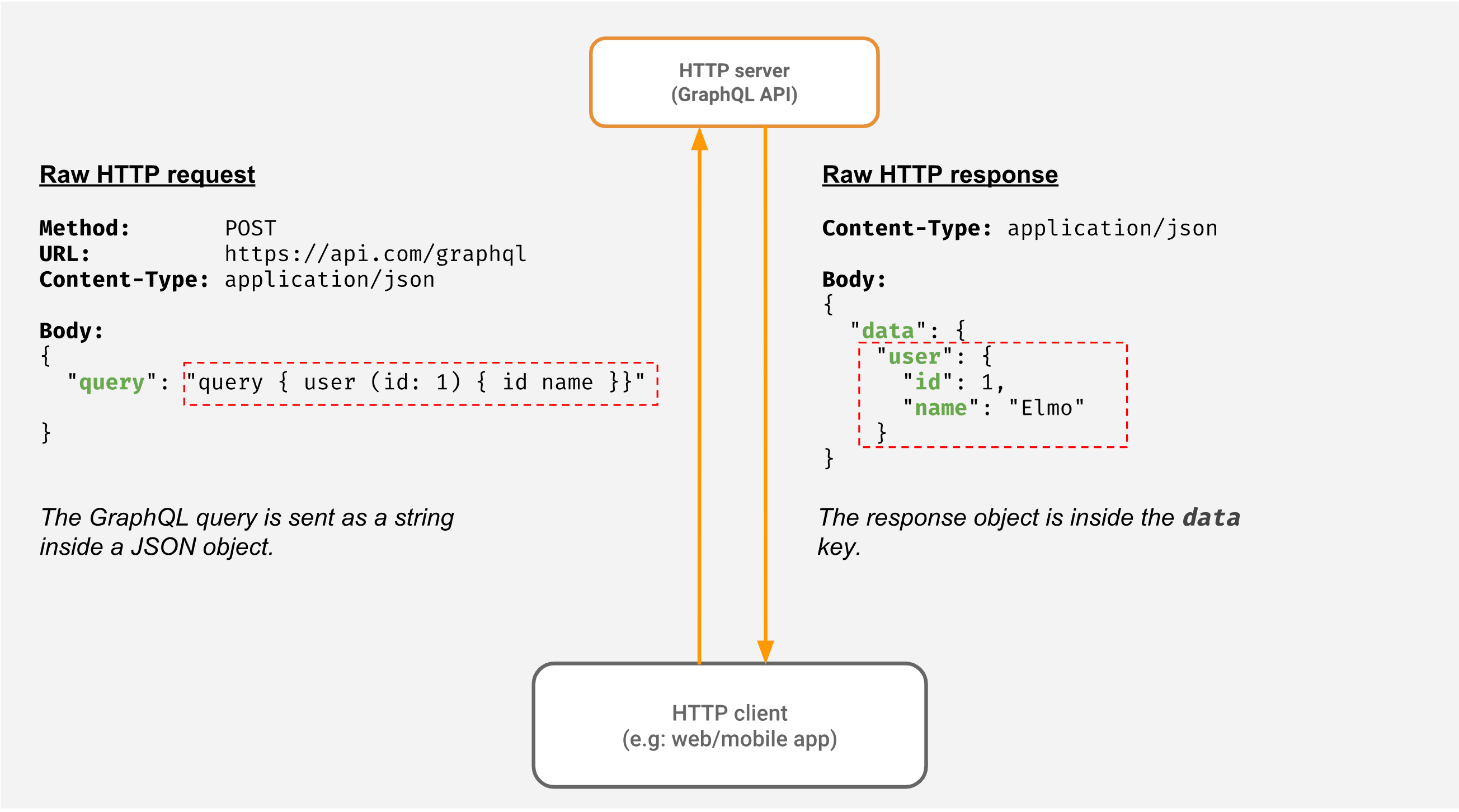
This is how it works:
-
Define the schema and resolvers on your server, then host the graphql endpoint at a
POST /graphqlroute.- schema: the type definitions defining interfaces made available to run queries and mutations on.
- query: semantics for defining a graphQL function to fetch defined interfaces and resources.
- mutations: semantics for defining a graphQL function to mutate defined interfaces and resources, but works the exact same as query, it's just semantics.
- resolvers: the actual code business logic you write that defines what data to return for when queries and mutations are invoked.
- schema: the type definitions defining interfaces made available to run queries and mutations on.
-
Invoke a query or mutation: From the frontend, invoke a query or mutation using graphQL syntax to the
POST /graphqlroute on a server.
// Setup a GraphQL client to use the endpoint

const client = new Client("http://localhost:4000/graphql");


// Now, send your query as a string (Note that ` is used to create a multi-line
// string in javascript).

client.query(`
  query {
    user {
      id
      name
    }
  }`);
- Receive data: GraphQL always returns data as JSON with a status code of 200, and the data being returned under the
datakey.
Here's the basic client-server flow:
- Note that the GraphQL query is not really JSON; it looks like the shape of the JSON you want. So when we make a 'POST' request to send our GraphQL query to the server, it is sent as a "string" by the client.
- The server gets the JSON object and extracts the query string. As per the GraphQL syntax and the graph data model (GraphQL schema), the server processes and validates the GraphQL query.
- Just like a typical API server, the GraphQL API server then makes calls to a database or other services to fetch the data that the client requested.
- The server then takes the data and returns it to the client in a JSON object
GraphQL vs REST
GraphQL fetches data in terms of graphs while REST is just based on resources.
| Requirement | REST | GraphQL |
|---|---|---|
| Fetching data objects | GET | query |
| Inserting data | POST | mutation |
| Updating/deleting data | PUT/PATCH/DELETE | mutation |
| Watching/subscribing to data | - | subscription |
- Type systems: GraphQL is strongly typed while REST is not.
- REST API: In REST APIs, there isn't a concept of a schema or type system.
- GraphQL: On the other hand, GraphQL has a strong type system to define what the API looks like using a schema.
- Caching: GraphQL does not have automatic caching support because all of its requests are POST requests, while REST GET requests can be cached easily, but client-side libraries like tanstack query and apollo make caching easier.
GraphQL caching
With REST APIs, all the GET endpoints can be cached at the server side or using a CDN. They can be cached by the browser as well and bookmarked by the client for frequent invocations. GraphQL doesn't follow the HTTP spec and is served over a single endpoint, usually (/graphql). Hence the queries cannot be cached in the same way as REST APIs.
However caching on the client side is better than REST because of the tooling. Some of the clients implementing caching layer (Apollo Client, URQL) make use of GraphQL's schema and type system using Introspection to allow them to maintain a cache on the client side.
Core concepts
Here are the structural terminology terms for what the server does to create a GraphQL schema that is then able to be served at an endpoint and successfully fetched from:
- schema: A schema is defined with fields mapped to types and serves as a contract between the client and the server.
- fields: the individual interfaces in graphQL documents, which represent single function invocations or resources.
- resolvers: the actual business logic that defines how code should be executed in order to fulfill queries, mutations, and subscription requests to schemas, dealing with the underlying data like a database.
Here are the terminology terms concerned with the client-server response cycle for GraphQL:
- graphQL operation: the string representation of a query, mutation, or a subscription that a client invokes to fetch or mutate schema data from the server.
- document: The content of a GraphQL request string is called the GraphQL document.
- Documents contain one or more graphQL operations, and this is what the client sends to the server to invoke all those operations.
Basically here are the steps of a client-server response cycle in graphQL:
- Client creates document: Client defines many graphQL operations, which include queries, mutations, and subscriptions, all in a document.
- Client sends document to server: Client sends a
POST /graphqlrequest sending the document along as a string in the request body. - Server resolves document: resolvers and schemas automatically handle what the document wants to fetch and mutate, and then sends back data.
- Client receives data: Client receives data resolved from server as JSON
All about operations
Operations: Basics
When a client is making a graphQL call to the server, we call that a graphQL operation, of which there are three types:
- query (a read-only fetch)
- mutation (a write followed by fetch)
- subscription (a long‐lived request that fetches data in response to source events.)
All of these graphQL operations takes in graphQL documents to request.
NOTE
All of these are technically the same, but semantically are meant to be used differently, and that is evident in how client-side libraries follow conventions when performing these different type of operations to the server even though business logic is the one that decides the actual difference between these operations.
Operations: Aliases
When you are fetching information about an author, let's say you have two images, different sizes and you have a field with an argument to do that.
In this case, you cannot use the same field twice under the same selection set and hence an Alias would be helpful to distinguish the two fields.
query fetchAuthor {
  author(id: 1) {
    name
    profile_pic_large: profile_pic(size: "large")
    profile_pic_small: profile_pic(size: "small")
  }
}
Operations: Fragments
Fragments make GraphQL even more reusable. If there are some parts of your document that reuses the same set of fields on a given type, then fragment can be powerful.
fragment authorFields on author {
  id
  name
  profile_pic
  created_at
}

query fetchAuthor {
  author(id: 1) {
    ...authorFields
  }
}

query fetchAuthors {
  author(limit: 5) {
    ...authorFields
  }
}
Operations: Directives
Directives are identifiers which add additional functionality without affecting the value of the response but can affect what response comes back to the client.
The identifier @ is optionally followed by a list of named arguments.
Some default server directives supported by GraphQL spec are:
@deprecated(reason: String)- marks the field as deprecated@skip (if: Boolean)- Skips GraphQL execution for this field@include (if: Boolean)- Calls resolver for an annotated field, if true.
Here is an example using directives.
query ($showFullname: Boolean!) {
  author {
    id
    name
    fullname @include(if: $showFullname)
  }
}
Queries
There are two types of queries:
- anonymous query: a query without a name
query {
  todos {
    title
  }
}
- named query: a query that you provide a name for, which is the best practice because it helps when debugging.
query getTodos {
  todos {
    title
  }
}
queries with arguments
In most API calls, you usually use parameters. e.g. to specify what data you're fetching.
- If you're familiar with making
GETcalls, you would have used a query parameter. - For example, to fetch only 10 todos you might have made this API call:
GET /api/todos?limit=10.
The GraphQL query analog of this is arguments, which are key-value pairs that you can attach to a "field" or "nested object".
GraphQL servers come with a default list of arguments, but you can also define custom arguments.
For both queries and fields, you can use the default list of arguments and "invoke" fields and queries with those built-in arguments, which contain these:
limit: the number of records to returnoffset: the number of records to skipwhere: conditional filtering of records based on the values of certain properties of the field.order_by: how to sort the list of records that are returned, with values following this syntax:
field(order_by: { property_name: desc/asc })
Here is an example of how to pass arguments to a field in a query.
query {
  author(limit: 5, offset: 10) {
    id
    name
  }
}
variables
Until now, you hardcoded the arguments in the queries. In real-life applications, though, the arguments might come from different parts of your application, such as filters for example. So you will pass them dynamically to your queries.
In GraphQL, you can pass arguments dynamically with the help of variables:
query ($limit: Int) {
  author(limit: $limit) {
    id
    name
  }
}
The variable(s) is defined at the top of the operation and the value for the variable can be sent by the client in a format that the server understands.
Typically variables are represented in JSON like below:
{
  limit: 5
}
multiple query operations
A single document can have multiple operations it in at once.
Here is an example of a document that has multiple query operations
query fetchAuthor {
  author(id: 1) {
    name
    profile_pic
  }
}
query fetchAuthors {
  author(limit: 5, order_by: { name: asc }) {
    id
    name
    profile_pic
  }
}
limit and offset
{
  todos(limit: 5, offset: 5) {
    title
    is_completed
    is_public
  }
}
order_by
The order_by key lets you sort the list of records that are returned, with values following this syntax:
field(order_by: { property_name: desc/asc })
Here is an example where we sort the todos field returned on the record in descending order based on the created_at field.
query {
  users (limit: 1) {
    id
    name
    todos(order_by: {created_at: desc}, limit: 5) {
      id
      title
    }
  }
}
where
The where argument lets you conditionally filter records based on the property value of fields:
{
  todos(where: {is_public: {_eq: false}}) {
    title
    is_public
    is_completed
  }
}
You can also use the where argument multiple times in one query. Let's say you want to see all the public notes from a specific user:
{
  users(where: {id: {_eq: "61dd5e7dc4b05c0069a39att"}}) {
    name
    todos(where: {is_public: {_eq: true}}) {
      title
      is_public
    }
  }
}
Subscriptions
GraphQL Subscriptions are implemented using the WebSocket protocol, enabling us to create a persistent connection between the server and client. The connection stays open until either party terminates it.
There are two ways to implement a subscription in graphQL:
subscriptionoperation: use thesubscriptionkeyword to make a query a subscription type, which triggers automatic use of websockets.
subscription {
  todos {
    id
    created_at
    is_completed
    is_public
    title
  }
}
- live queries: Use the
@livedirective to decorate a normal query and make it a subscription without the automatic websockets, but now you have to write the business logic yourself to implement WebSockets or some other real-time data solution to actually handle the live query.
query @live {
  todos {
    id
    created_at
    is_completed
    is_public
    title
  }
}
Live queries vs subscriptions
A Live Query watches the query result and whenever it changes, the server returns the new results to the client by invoking the resolver.
A subscription uses websockets behind the scenes to keep the connection open and facilitate real-time data flow from a data store to a client.
Here are the main differences:
- graphQL support: One significant difference is that Subscriptions are defined in the GraphQL Specification, whereas Live Queries are not. That means there is no official definition of a Live Query.
- realtime: Another difference is that Subscriptions respond to events, sending back data on insertions, while live queries are reactive and return new results if the arguments passed to a query changes.
- how subscriptions work: For example, you might have a Subscription that reacts to an insertion. When the insertion occurs, the server sends back the new data to the client.
- how live queries work: On the other hand, Live Queries watch the latest result of a query and whenever it changes, the server returns the latest results to the client. Rather than responding to an event, they monitor for changes in the query result.
Resolvers
The basic signature of a resolver looks like the following:
resolverFunc(data, args, context, info)
data- previously fetched data from the parentargs- key-value pairs of arguments, optionalcontext- state information per request, typically used for auth logicinfo- metadata about the selection context for traversal
N + 1 problem
Let's consider we have to fetch a list of authors and their articles. In a simple REST API, the naive version would look something like this:
fetchData: async () => ORM.getAuthors().getArticles();
There are two (SQL) queries to the database - one to fetch the list of authors and another to fetch the list of articles of each author.
The GraphQL query for this would look something like this:
query {
  author {
    id
    name
    articles {
      id
      title
      content
    }
  }
}
The resolver would look something like this:
resolvers = {
  Query: {
    author: async () => {
      return ORM.getAllAuthors()
    }
  },
  Author: {
    articles:  async (authorObj, args) => {
      return ORM.getArticlesBy(authorObj.id)
    }
  },
}
Dataloader
Dataloader is a utility used as part of your application’s data fetching layer. In trying to solve the N+1 problem, it waits for all the resolvers to load in their individual values, coalesce all individual loads and call the batch function with the requested keys.
Fetching from the client
Basic fetch
To make a client-side request to a graphQL endpoint, you make a POST /graphql request with a JSON request body which should have these properties:
query: a query operation string to executevariables: a JSON object of variables to pass into the query if the query is using variables.
const limit = 5;
const query = `query author($limit: Int!) {
    author(limit: $limit) {
        id
        name
    }
}`;

fetch('/graphql', {
  method: 'POST',
  headers: {
    'Content-Type': 'application/json',
    'Accept': 'application/json',
  },
  body: JSON.stringify({
    query,
    variables: { limit },
  })
})
  .then(r => r.json())
  .then(data => console.log('data returned:', data));
Introspection
The GraphQL query language is strongly typed. Due to its strong type system, GraphQL gives you the ability to query and understand the underlying schema.
Thus, the Introspection feature allows you to query the schema and discover the available queries, mutations, subscriptions, types and fields in a specific GraphQL API.
The schema acts as a contract between the frontend and backend, improving the communication between them.
But even with the schema, we have three core concerns:
- But how does the frontend client know what the schema looks like?
- How do they prevent over-fetching or under-fetching?
- How do they know what operations are available?
That's where the Introspection query helps.
A server exposes the following introspection queries on the Query operation type.
__schema__type__typename
NOTE
Note that introspection queries start with __
Fetch available queries
A query operation requesting __schema:
query {
  __schema {
    queryType {
      fields {
        name
        description
        deprecationReason
        isDeprecated
        __typename
      }
    }
  }
}
Will return all the queries available on the server and give back metadata about those queries, such as:
- deprecation info: whether the query is deprecated or not, basically if it has the
@deprecateddirective attached to it. - identfication: Has
nameanddescriptionfields to return the identification of the specific query - type info: Returns the schema type of a specific query via
__typenameproperty, like"__Field"if the query was a field.
// what was returned from document
{
  "data": {
    "__schema": {
      "queryType": {
        "fields": [
          {
            "name": "getCar",
            "description": null,
            "deprecationReason": null,
            "isDeprecated": false,
            "__typename": "__Field"
          },
          {
            "name": "getCars",
            "description": null,
            "deprecationReason": null,
            "isDeprecated": false,
            "__typename": "__Field"
          }
        ]
      }
    }
  }
}
Fetch available mutations
SO this:
query {
  __schema {
    mutationType {
      fields {
        name
        description
        __typename
        isDeprecated
        args {
          name
          __typename
        }
      }
    }
  }
}
Returns something like this:
{
  "data": {
    "__schema": {
      "mutationType": {
        "fields": [
          {
            "name": "addCar",
            "description": null,
            "__typename": "__Field",
            "isDeprecated": false,
            "args": [
              {
                "name": "input",
                "__typename": "__InputValue"
              }
            ]
          }
        ]
      }
    }
  }
}
Fetch all available types
So this:
query {
  __schema {
    types {
      name
      description
    }
  }
}
Returns all of this:
{
  "data": {
    "__schema": {
      "types": [
        {
          "name": "CarType",
          "description": null
        },
        {
          "name": "Car",
          "description": null
        },
        {
          "name": "ID",
          "description": "The `ID` scalar type represents a unique identifier, often used to refetch an object or as key for a cache. The ID type appears in a JSON response as a String; however, it is not intended to be human-readable. When expected as an input type, any string (such as `\"4\"`) or integer (such as `4`) input value will be accepted as an ID."
        },
        {
          "name": "String",
          "description": "The `String` scalar type represents textual data, represented as UTF-8 character sequences. The String type is most often used by GraphQL to represent free-form human-readable text."
        },
        {
          "name": "Int",
          "description": "The `Int` scalar type represents non-fractional signed whole numeric values. Int can represent values between -(2^31) and 2^31 - 1."
        },
        {
          "name": "Query",
          "description": null
        },
        {
          "name": "AddCarInput",
          "description": null
        },
        {
          "name": "Mutation",
          "description": null
        },
        {
          "name": "Boolean",
          "description": "The `Boolean` scalar type represents `true` or `false`."
        },
        {
          "name": "__Schema",
          "description": "A GraphQL Schema defines the capabilities of a GraphQL server. It exposes all available types and directives on the server, as well as the entry points for query, mutation, and subscription operations."
        },
        {
          "name": "__Type",
          "description": "The fundamental unit of any GraphQL Schema is the type. There are many kinds of types in GraphQL as represented by the `__TypeKind` enum.\n\nDepending on the kind of a type, certain fields describe information about that type. Scalar types provide no information beyond a name, description and optional `specifiedByURL`, while Enum types provide their values. Object and Interface types provide the fields they describe. Abstract types, Union and Interface, provide the Object types possible at runtime. List and NonNull types compose other types."
        },
        {
          "name": "__TypeKind",
          "description": "An enum describing what kind of type a given `__Type` is."
        },
        {
          "name": "__Field",
          "description": "Object and Interface types are described by a list of Fields, each of which has a name, potentially a list of arguments, and a return type."
        },
        {
          "name": "__InputValue",
          "description": "Arguments provided to Fields or Directives and the input fields of an InputObject are represented as Input Values which describe their type and optionally a default value."
        },
        {
          "name": "__EnumValue",
          "description": "One possible value for a given Enum. Enum values are unique values, not a placeholder for a string or numeric value. However an Enum value is returned in a JSON response as a string."
        },
        {
          "name": "__Directive",
          "description": "A Directive provides a way to describe alternate runtime execution and type validation behavior in a GraphQL document.\n\nIn some cases, you need to provide options to alter GraphQL's execution behavior in ways field arguments will not suffice, such as conditionally including or skipping a field. Directives provide this by describing additional information to the executor."
        },
        {
          "name": "__DirectiveLocation",
          "description": "A Directive can be adjacent to many parts of the GraphQL language, a __DirectiveLocation describes one such possible adjacencies."
        }
      ]
    }
  }
}
Making a basic graphQL server in Deno
import { GraphQLHTTP } from "https://deno.land/x/gql@1.1.2/mod.ts";
import { makeExecutableSchema } from "https://deno.land/x/graphql_tools@0.0.2/mod.ts";
import { gql } from "https://deno.land/x/graphql_tag@0.0.1/mod.ts";


// describes structure of GraphQL API data avaiable
const typeDefs = gql`
  type Query {
    hello: String
  }
`;

// functions to run when requesting data from GraphQL API
const resolvers = {
  Query: {
    hello: () => "Hello, world!",
  },
};

const schema = makeExecutableSchema({ typeDefs, resolvers });

export async function handler(req: Request): Promise<Response> {
  const url = new URL(req.url);

  // on graphql endpoint, serve the GraphQL API
  if (url.pathname === "/graphql") {
    return await GraphQLHTTP<Request>({
      schema,
      graphiql: true,
    })(req);
  }

  return new Response("<h1>Welcome to Deno!</h1>", {
    headers: { "content-type": "text/html" },
  });
}

if (import.meta.main) {
  Deno.serve(handler);
}
- Create your type definitions. In this case, the only resource we are defining for this API is the string
hello.
// describes structure of GraphQL API data avaiable
const typeDefs = gql`
  type Query {
    hello: String
  }
`;
- Create your resolvers for the resources: When requesting the
helloresource from the GraphQL API, what should actually get returned? The function invocation to return the data when a specific resource is requested is what a resolver is.
// functions to run when requesting data from GraphQL API
const resolvers = {
  Query: {
    hello: () => "Hello, world!",
  },
};
- Create a graphql schema and serve it on the
/graphqlroute
const schema = makeExecutableSchema({ typeDefs, resolvers });

export async function handler(req: Request): Promise<Response> {
  const url = new URL(req.url);

  // on graphql endpoint, serve the GraphQL API
  if (url.pathname === "/graphql") {
    return await GraphQLHTTP<Request>({
      schema,
      graphiql: true,
    })(req);
  }

  return new Response("<h1>Welcome to Deno!</h1>", {
    headers: { "content-type": "text/html" },
  });
}
A slightly more complicated example
Let's initialize a database:
import * as postgres from "https://deno.land/x/postgres@v0.14.2/mod.ts";

const connect = async () => {
  // Get the connection string from the environment variable "DATABASE_URL"
  const databaseUrl = Deno.env.get("DATABASE_URL")!;

  // Create a database pool with three connections that are lazily established
  const pool = new postgres.Pool(databaseUrl, 3, true);

  // Connect to the database
  const connection = await pool.connect();
  return connection;
};

const allDinosaurs = async () => {
  const connection = await connect();
  const result = await connection.queryObject`
          SELECT name, description FROM dinosaurs
        `;
  return result.rows;
};

// query, takes in name variables from graphql API
const oneDinosaur = async (args: any) => {
  const connection = await connect();
  const result = await connection.queryObject`
          SELECT name, description FROM dinosaurs WHERE name = ${args.name}
        `;
  return result.rows;
};

// mutation, takes in name and description variables from graphql API
const addDinosaur = async (args: any) => {
  const connection = await connect();
  const result = await connection.queryObject`
            INSERT INTO dinosaurs(name, description) VALUES(${args.name}, ${args.description}) RETURNING name, description
        `;
  return result.rows[0];
};
Then let the graphQL queries pull from the database when the resolvers are invoked:
import { gql } from "https://deno.land/x/graphql_tag@0.0.1/mod.ts";

export const typeDefs = gql`
  type Query {
    allDinosaurs: [Dinosaur]
    oneDinosaur(name: String): Dinosaur
  }

  type Dinosaur {
    name: String
    description: String
  }

  type Mutation {
    addDinosaur(name: String, description: String): Dinosaur
  }
`;

export const resolvers = {
  Query: {
    allDinosaurs: () => allDinosaurs(),
    oneDinosaur: (_: any, args: any) => oneDinosaur(args),
  },
  Mutation: {
    addDinosaur: (_: any, args: any) => addDinosaur(args),
  },
};
Then you can make queries like this:
query {
  allDinosaurs {
    name
    description
  }
}
Testing GraphQL
GraphQL under the hood is just making a POST request to a /api/graphql route on your server and passing a specific GraphQL query that invokes resolvers.
In the example below, we fetch the graphQL route at /api/graphql via a POST request and pass in a JSON body of a stringified GraphQL query
import { assertEquals } from "@std/assert";
import { handler } from "./main.ts";

async function executeGraphQL(query: string) {
  const res = await handler(
    // create a new request to the /api/graphql route
    new Request("http://localhost:8000/api/graphql", {
      method: "POST",
      headers: {
        "content-type": "application/json",
      },
      body: JSON.stringify({ query }),
    }),
  );

  return await res.json();
}
Here are some test examples:
Deno.test(
  "resolves Character interface values in characters query",
  async () => {
    const result = await executeGraphQL(`#graphql
		query {
			characters {
				__typename
				id
				name
				... on Person {
					countryBornIn
				}
			}
		}
	`);

    assertEquals(result.errors, undefined);
    assertEquals(result.data.characters, [
      {
        __typename: "Person",
        id: "1",
        name: "Luke Skywalker",
        countryBornIn: "Tatooine",
      },
    ]);
  },
);

Deno.test("returns a single character by id", async () => {
  const result = await executeGraphQL(`#graphql
		query {
			character(id: "1") {
				__typename
				id
				name
				... on Person {
					countryBornIn
				}
			}
		}
	`);

  assertEquals(result.errors, undefined);
  assertEquals(result.data.character, {
    __typename: "Person",
    id: "1",
    name: "Luke Skywalker",
    countryBornIn: "Tatooine",
  });
});
Making a basic express server
Defining the schema
- Create graphQL objects:
type Store {
	store: string
}

enum Soldout {
	SOLDOUT
	ONSALE
}

type Product {
	id: ID!
	name: String!
	description: String
	price: Float!
	soldout: Soldout
	stores: Store[]!
	inventory: Int
}
- Create graphQL query:
type Query {
	getProduct(id: ID!): Product
	getProducts: [Product]!
}
- Create GraphQL mutations:
input StoreInput {
	store: String
}

input ProductInput {
	id: ID!
	name: String!
	description: String
	price: Float!
	soldout: Soldout
	stores: [StoreInput]!
	inventory: Int
}

type Mutation {
	createProduct(input: ProductInput): Product
	updateProduct(input: ProductInput): Product
	deleteProduct(productId: ID): Product
}
Now here are examples of how we would invoke the graphQL mutations and queries we set up:
mutation {
	# 1. invoke mutation function, pass argument
	createProduct(input: {
		name: "prod1",
		price: 40.99,
		soldout: ONSALE,
		inventory: 10,
		stores: [
			{store: "store1"}
		]
	}) {   # get back specific fields from Product
		price
		name
		id
		soldout
	}
}
GraphQL syntax fundamentals
Types, Queries, Resolvers
GraphQL houses four components to create an API:
- types: Defined in your graphQL schema, these are like typescript types that you can use as type definitions for the resources in your query./
- query: There can only be one query per graphQL app. This query describes all available resources of the API and gives type definitions to them using the types you defined earlier.
- mutation: mutations define stuff like POST, PUT, PATCH, and DELETE requests, where some kind of side-effect operation is to be done, like update a database record.
- For the most part, these work exactly like queries.
- resolvers: You as the server define resolvers for the graphQL schema, which is the actual code and business logic to run when a certain resource is requested in a query or when a mutation is triggered.
Types
There are 4 classifications of types in a graphql schema
Scalar types
Basic data types (e.g., Int, Float, String, Boolean, ID).
ID: a union type of aStringorInt, but the point is that anIDtype represents a unique value, sort of like a primary key for a table, and thus GraphQL treats it specially for optimization purposes.
array types
You can also make any type an array by putting that type, whether an object type or a scalar type, in square brackets [].
type nullability
By default, all properties on a type in graphQL are nullable, meaning they are optional and can be null. If you want to override that and a force a property to be required and thus not accept null values, you can use the non-null assertion operator !
Object types
You define object types with the type keyword to create a new type that you can reference anywhere else in your schema:
Represent a kind of object you can fetch from your service, and what fields it has.
type Post {
	id: ID!
	user_id: ID!
	content: String!
}

type User {
  id: ID!
  name: String! // non-nullable string
  email: String! // non-nullable string
  posts: [Post] // non-nullable array of Post objects
}
Interface types
Abstract types that let you define fields that multiple types must include.
- Define an interface like so:
interface Character {
  id: ID!
  name: String!
  friends: [Character]
  appearsIn: [Episode]!
}
- Create types that implement the interface using the
implementskeyword:
type Person implements Character {
  id: ID!
  name: String!
  friends: [Character]
  appearsIn: [Episode]!

  countryBornIn: String! # property unique to Person type
}

type Alien implements Character {
  id: ID!
  name: String!
  friends: [Character]
  appearsIn: [Episode]!

  planetBornIn: String! # property unique to Alien type
}

type Query {
	characters: [Character]!
	character(id: ID!): Character
}
Now that Person and Alien implement the same interface, they are basically interchangeable with the Character interface they implement and can thus substitute for those types. However, at runtime to find out which interface implementation is which, we have to create a type resolver:
import { Character, Person } from "./typedefs.ts";

interface IRepository {
  getCharacters(): Promise<Character[]>;
  getCharacterById(id: string): Promise<Character | null>;
}

class InMemoryRepository implements IRepository {
  private characters: Character[];
  constructor() {
    this.characters = [
      {
        id: "1",
        name: "Luke Skywalker",
        friends: [],
        countryBornIn: "Tatooine",
      } as Person,
    ];
  }

  async getCharacters(): Promise<Character[]> {
    return this.characters;
  }

  async getCharacterById(id: string): Promise<Character | null> {
    return this.characters.find((char) => char.id === id) || null;
  }
}

const repository = new InMemoryRepository();

export const resolvers = {
  Character: {
    __resolveType: (character: Character) => {
      if ("countryBornIn" in character) {
        return "Person";
      }

      if ("planetBornIn" in character) {
        return "Alien";
      }

      return null;
    },
  },
  Query: {
    characters: () => repository.getCharacters(),
    character: (_: unknown, { id }: { id: string }) =>
      repository.getCharacterById(id),
  },
};
Union types
Union types are the same as in typescript, but you use the union keyword specifically to create an object type that is a union of other types.
union ProfileInfo = Person | Alien

type User {
	id: ID!
	email: String!
	profile_pic: String
}

type Profile {
	id: ID!
	profile_info: ProfileInfo!
	user_info: User!
}
Directives
Directives are special tokens in the schema language that can change the way the server interprets parts of the schema.
Here are some built-in directives GraphQL provides out of the box:
@deprecated: Indicates that a field is no longer supported.@include(if: Boolean): Only includes this field in the result if the argument istrue.@skip(if: Boolean): Skips this field if the argument istrue.
type User {
  id: ID!
  oldEmail: String @deprecated(reason: "Use `email`.")
  email: String!
}
We can also create custom directives that we can then create business logic for. This is especially useful if we want to show or hide fields based on authentication or authorization:
type User {
  id: ID!
  oldEmail: String @deprecated(reason: "Use `email`.")
  email: String!
  password: String! @auth(required=true) # this field will have an auth=true property attached to it for which we can then write business logic to hide it or show it depending on the app.
}
Enums
Enums are special union types of literal strings.
enum Role {
  ADMIN
  USER
  GUEST
}
Queries and resolvers
Basics of resolvers
Each resolver in GraphQL is a function that optionally takes four arguments:
root(orparent): The result from the previous level of the resolver chain.args: An object that contains all GraphQL arguments provided in the query.context: An object shared across all resolvers that executes for a particular query. It often contains per-request state such as authentication information that you set on it. It's useful for dependency injection.info: A field-specific information object useful for advanced cases like building dynamic queries.
Here is an example of what a resolver for the user resource might look like:
const resolvers = {
  Query: {
    user: (parent, args, context, info) => {
      return context.dataSources.userAPI.getUserById(args.id);
    }
  }
}
And for a more complex example, here is what queries and mutation resolvers look like when we add a database to the mix:
const resolvers = {
	Query: {
	  posts: (parent, args, context) => context.db.getPosts(),
	  post: (parent, { id }, context) => context.db.getPostById(id),
	},

	Mutation: {
	  createPost: (parent, { post }, context) => context.db.createPost(post),
	  deletePost: (parent, { id }, context) => context.db.deletePost(id),
	}
}
Passing arguments to queries
You can define resources in the query to take in scalar type arguments like so:
type Query {
	character(id: ID!): Character # takes in one argument of type ID
}
If you want queries to take in object types as arguments, you need to define an input type which is an object type for the specific purpose of type-assigning a parameter to a query that should be an object type.
NOTE
This is turtles all the way down. Basically, if you make a property in an input type and type assign it to an object type, you have to create its own input type for that
input CharacterSearchCriteria {
	name: String # optional name search
	id: String # optional id search
	friend_names: [String] # optional friend names search
}


type Query {
	character(id: ID!): Character # takes in one argument of type ID
	characters(searchOptions: CharacterSearchCriteria): [Character]!
}
To make life easier for yourself, create a typescript interface for the input type you created
export type InputTypes = {
  CharacterSearchCriteria: {
    name?: string;
    id?: string;
    friend_names?: string[];
  };
};
And here is the example resolver you would create for it:
export const resolvers = {
  ...typeResolvers,
  Query: {
    // ...
    charactersSearch: async (
      _: unknown,
      {
        searchOptions,
      }: { searchOptions: InputTypes["CharacterSearchCriteria"] },
    ) => {
      return (await CharacterRepository.getCharacters()).filter((character) => {
        if (searchOptions.name) {
          return character.name.includes(searchOptions.name);
        }
        if (searchOptions.id) {
          return character.id === searchOptions.id;
        }
        if (searchOptions.friend_names) {
          return character.friends.some((friend) =>
            searchOptions.friend_names?.includes(friend.name),
          );
        }
        return false;
      });
    },
  },
};
Then when executing a query, you pass in exact values that satisfy the types you set for the parameters:
 query {
    charactersSearch(searchOptions: {
      name: "Luke"
    }) {
      id
      name
      __typename
  	}
  }
Querying for interface/union types (type resolvers)
You have additional syntax you can use when querying interface or union types to get unique properties of interface implementation object types:
If you have this structure:
type Person implements Character {
  id: ID!
  name: String!
  friends: [Character]
  appearsIn: [Episode]!

  countryBornIn: String! # property unique to Person type
}

type Alien implements Character {
  id: ID!
  name: String!
  friends: [Character]
  appearsIn: [Episode]!

  planetBornIn: String! # property unique to Alien type
}

type Query {
	characters: [Character]!
	character(id: ID!): Character
}
Then you resolvers should account for the specific interface implementations:
const repository = new InMemoryRepository();

export const resolvers = {
  Character: {
    __resolveType: (character: Character) => {
      if ("countryBornIn" in character) {
        return "Person";
      }

      if ("planetBornIn" in character) {
        return "Alien";
      }

      return null;
    },
  },
  Query: {
    characters: () => repository.getCharacters(),
    character: (_: unknown, { id }: { id: string }) =>
      repository.getCharacterById(id),
  },
};
And then you can make a query like so:
__typename: a built-in graphQL property on every object type that specifies the name of the type, likePersonorAlien... on Person {}: a type resolver that if theCharacterimplementation is the specific type ofPerson, then you can access person-specific properties.
query {
  characters {
    name
    __typename
    id
    ... on Person {
      countryBornIn
    }
    ... on Alien {
      planetBornIn
    }
  }
}
You have to specify type resolvers for a GraphQL type for one of the following two conditions:
- interface type: If a resource resolves to an interface type, you have to create a type resolver for it to typecast the resource to a specific interface implementation.
- union type: If you have a union type, you need to create a type resolver for that type casting it to one or the other.
Look at the types below:
Here is an example of creating type resolvers for both the Character interface and the ProfileInfo union type.
import { CharacterRepository } from "./data/character.ts";
import { ProfileRepository } from "./data/profile.ts";
import { UserRepository } from "./data/user.ts";
import { Alien, Character, Person, Profile } from "./typedefs.ts";

const characterTypeResolver = (character: Character) => {
  if ("countryBornIn" in character) {
    return "Person";
  }

  if ("planetBornIn" in character) {
    return "Alien";
  }

  return "Character";
};

const profileInfoTypeResolver = (profileInfo: Person | Alien) => {
  if ("countryBornIn" in profileInfo) {
    return "Person";
  }

  if ("planetBornIn" in profileInfo) {
    return "Alien";
  }

  return null;
};

// resolvers for resolving the types of interfaces and unions in the GraphQL schema
const typeResolvers = {
  Character: {
    __resolveType: characterTypeResolver,
  },
  ProfileInfo: {
    __resolveType: profileInfoTypeResolver,
  },
};

export const resolvers = {
  ...typeResolvers,
  Query: {
    characters: () => CharacterRepository.getCharacters(),
    character: (_: unknown, { id }: { id: string }) =>
      CharacterRepository.getCharacterById(id),
    users: () => UserRepository.getUsers(),
    user: (_: unknown, { id }: { id: string }) =>
      UserRepository.getUserById(id),
    profiles: () => ProfileRepository.getProfiles(),
    profile: (_: unknown, { id }: { id: string }) =>
      ProfileRepository.getProfileById(id),
  },
};
Now here's a full example query you can make:
query {
    profiles {
      id
      profile_pic
      user_info {
        id
        email
      }
      # profile_info is a union type of Person | Alien
      # you need to resolve the types individually with ... on Person
      profile_info {
        __typename
        ... on Person {
          name
          countryBornIn
        }
        ... on Alien {
          name
          planetBornIn
        }
      }
    }
  }
Type resolvers with Zod schema
For a better pattern, create your type resolvers where you validate data using Zod, like so:
import { z } from "zod";
import { Alien, Person, Character } from "./typedefs.ts";

// Forward declaration
type CharacterSchemaType = z.ZodType<Character>;

const characterSchema: CharacterSchemaType = z.lazy(() =>
  z.union([personSchema, alienSchema]),
);

// Base fields
const baseCharacter = {
  id: z.string(),
  name: z.string(),
  friends: z.array(characterSchema),
};

// Person
const personSchema: z.ZodType<Person> = z.object({
  ...baseCharacter,
  countryBornIn: z.string(),
});

// Alien
const alienSchema: z.ZodType<Alien> = z.object({
  ...baseCharacter,
  planetBornIn: z.string(),
});

// map for mapping string type to schema validation
const typeSchemaMap = {
  Person: personSchema,
  Alien: alienSchema,
  Character: characterSchema,
} as const;

// function for validating data against several types and returning correct one
export function getDataType<T extends keyof typeof typeSchemaMap>(
  data: unknown,
  types: T[],
  defaultType?: T,
): T | null {
  for (const type of types) {
    const schema = typeSchemaMap[type];
    if (schema.safeParse(data).success) {
      return type;
    }
  }
  return defaultType ?? null;
}
And then this is how much your type resolvers get simplified:
import { getDataType } from "./schemas.ts";
import { Alien, Character, Person, Profile } from "./typedefs.ts";

const characterTypeResolver = (character: Character) => {
  return getDataType(character, ["Person", "Alien"], "Character");
};

const profileInfoTypeResolver = (profileInfo: Person | Alien) => {
  return getDataType(profileInfo, ["Person", "Alien"]);
};

// resolvers for resolving the types of interfaces and unions in the GraphQL schema
export const typeResolvers = {
  Character: {
    __resolveType: characterTypeResolver,
  },
  ProfileInfo: {
    __resolveType: profileInfoTypeResolver,
  },
};
Querying with the repository pattern
In the spirit of abstracting different data providers like how GraphQL does, we can take it a step forward with a repository pattern like so:
import { Character, Person } from "../typedefs.ts";

export interface CharacterRepository {
  getCharacters(): Promise<Character[]>;
  getCharacterById(id: string): Promise<Character | null>;
}

class InMemoryCharacterRepository implements CharacterRepository {
  private characters: Character[];
  constructor() {
    this.characters = [
      {
        id: "1",
        name: "Luke Skywalker",
        friends: [],
        countryBornIn: "Tatooine",
      } as Person,
    ];
  }

  async getCharacters(): Promise<Character[]> {
    return this.characters;
  }

  async getCharacterById(id: string): Promise<Character | null> {
    return this.characters.find((char) => char.id === id) || null;
  }
}

export const CharacterRepository = new InMemoryCharacterRepository();
import type { User } from "../typedefs.ts";

export interface UserRepository {
  getUsers(): Promise<User[]>;
  getUserById(id: string): Promise<User | null>;
}

class InMemoryUserRepository implements UserRepository {
  private Users: User[];
  constructor() {
    this.Users = [
      {
        id: "1",
        email: "luke@rebels.org",
      } as User,
    ];
  }

  async getUsers(): Promise<User[]> {
    return this.Users;
  }

  async getUserById(id: string): Promise<User | null> {
    return this.Users.find((char) => char.id === id) || null;
  }
}

export const UserRepository = new InMemoryUserRepository();
And here's an example of a repository that uses other repositories directly:
import type { Profile } from "../typedefs.ts";
import { CharacterRepository } from "./character.ts";
import { UserRepository } from "./user.ts";

export interface ProfileRepository {
  getProfiles(): Promise<Profile[]>;
  getProfileById(id: string): Promise<Profile | null>;
}

class InMemoryProfileRepository implements ProfileRepository {
  private Profiles!: Profile[];
  private initialized: Promise<boolean> | null = null;
  constructor() {
    this.initialized = this.init().then(() => true);
  }

  async init() {
    this.Profiles = [
      {
        id: "1",
        profile_info: await CharacterRepository.getCharacterById("1"),
        user_info: await UserRepository.getUserById("1"),
        profile_pic: "https://link-shortener.aadilmallick.deno.net/MTI0ZGE5ZDQ",
      } as Profile,
    ];
  }

  async getProfiles(): Promise<Profile[]> {
    if (this.initialized) {
      await this.initialized;
    }
    return this.Profiles;
  }

  async getProfileById(id: string): Promise<Profile | null> {
    if (this.initialized) {
      await this.initialized;
    }
    return this.Profiles.find((profile) => profile.id === id) || null;
  }
}

export const ProfileRepository = new InMemoryProfileRepository();
And then here is the full repository manager:
/**
 * A file for providing a unified interface over calling the various repositories. This is useful for testing and mocking, as well as for providing a single point of access to the data layer.
 *
 * This file is not strictly necessary, but it can be useful for organizing the code and providing a single point of access to the data layer.
 */

import { Character, Profile, User } from "../typedefs.ts";
import { CharacterRepository } from "./character.ts";
import { ProfileRepository } from "./profile.ts";
import { UserRepository } from "./user.ts";

interface Repository<T extends { id: string }> {
  getEntity(id: string): Promise<T | null>;
  getEntities(): Promise<T[]>;
}

// for stuff like localstorage, better-sqlite, etc.
class InMemoryRepository<T extends { id: string }> implements Repository<T> {
  private entities: T[];

  constructor(entities: T[]) {
    this.entities = entities;
  }

  async getEntity(id: string): Promise<T | null> {
    return this.entities.find((entity) => entity.id === id) || null;
  }

  async getEntities(): Promise<T[]> {
    return this.entities;
  }
}

// for database connections
abstract class AsyncRepository<T> implements Repository<T> {
  protected initialized: Promise<boolean> | null = null;

  constructor() {
    this.initialized = this.init()
      .then(() => true)
      .catch(() => false);
  }

  protected async isReady() {
    if (this.initialized === null) {
      return await this.init()
        .then(() => true)
        .catch(() => false);
    }
    return await this.initialized;
  }

  abstract init(): Promise<void>;

  abstract getEntity(id: string): Promise<T | null>;

  abstract getEntities(): Promise<T[]>;
}

export class RepositoryManager<T extends Record<string, Repository<any>>> {
  constructor(public repositories: T) {}

  getRepository<K extends keyof T>(name: K): T[K] {
    return this.repositories[name];
  }
}

export const repositoryManager = new RepositoryManager({
  Characters: {
    getEntities: CharacterRepository.getCharacters,
    getEntity: CharacterRepository.getCharacterById,
  } as Repository<Character>,
  Users: {
    getEntities: UserRepository.getUsers,
    getEntity: UserRepository.getUserById,
  } as Repository<User>,
  Profiles: {
    getEntities: ProfileRepository.getProfiles,
    getEntity: ProfileRepository.getProfileById,
  } as Repository<Profile>,
});
Then here are the resolvers for that:
import { CharacterRepository } from "./data/character.ts";
import { ProfileRepository } from "./data/profile.ts";
import { UserRepository } from "./data/user.ts";
import { Alien, Character, Person, Profile } from "./typedefs.ts";

const characterTypeResolver = (character: Character) => {
  if ("countryBornIn" in character) {
    return "Person";
  }

  if ("planetBornIn" in character) {
    return "Alien";
  }

  return "character";
};

const profileInfoTypeResolver = (profileInfo: Person | Alien) => {
  if ("countryBornIn" in profileInfo) {
    return "Person";
  }

  if ("planetBornIn" in profileInfo) {
    return "Alien";
  }

  return null;
};

// resolvers for resolving the types of interfaces and unions in the GraphQL schema
const typeResolvers = {
  Character: {
    __resolveType: characterTypeResolver,
  },
  ProfileInfo: {
    __resolveType: profileInfoTypeResolver,
  },
};

export const resolvers = {
  ...typeResolvers,
  Query: {
    characters: () => CharacterRepository.getCharacters(),
    character: (_: unknown, { id }: { id: string }) =>
      CharacterRepository.getCharacterById(id),
    users: () => UserRepository.getUsers(),
    user: (_: unknown, { id }: { id: string }) =>
      UserRepository.getUserById(id),
    profiles: () => ProfileRepository.getProfiles(),
    profile: (_: unknown, { id }: { id: string }) =>
      ProfileRepository.getProfileById(id),
  },
};
GraphQL con: cyclic queries
Becuase GraphQL is a graph query language, if two entities have a one-to-one relationship (every profile has a user and every user has a profile) then you can make cyclic queries that extend infinitely, performing infinite recursion.
If each level deep of a cyclic query goes to a database call, then you're putting near infinite reads/writes and unnecessary DB calls, which will overload your servers.
This is only really a problem in developer-facing graphql APIs, but to mitigate this issue, there are several hacks you can do:
- use directives: Directives are like stateful variables attached to resources that you can update over time with each query, so you can do something like create a directive to keep track of the nested levels in a query and stop the query once you reach a certain nesting level.
- use third party libraries
Advanced Resolvers
Resolving nested objects and virtuals
Nested object types require resolvers to handle dependencies and fetch data efficiently. If you are fetching nested objects using something in-memory like local storage, then you can store an entire object's structure and sub-objects in memory, but often nested objects require an extra database call if you want to populate them
Take a look at this example where A User object with nested [Posts], and each Post has nested Comments of type [Comment]
type User {
  id: ID!
  name: String!
  posts: [Post]
}

type Post {
  id: ID!
  title: String!
  author: User!
  comments: [Comment]
}

type Comment {
  id: ID!
  content: String!
  author: User!
}
If we were using a database that fetches data asynchronously and expects tables to be flat, then here is how we would populate nested objects with resolvers:
const nestedResolvers = {
  User: {
    posts(parent, args, context) {
      return context.db.getPostsByUserId(parent.id);
    }
  },
  Post: {
    author(parent, args, context) {
      return context.db.getUserById(parent.authorId);
    },
    comments(parent, args, context) {
      return context.db.getCommentsByPostId(parent.id);
    }
  },
  Comment: {
    author(parent, args, context) {
      return context.db.getUserById(parent.authorId);
    }
  }
}

export const resolvers = {
  ...nestedResolvers,
  Query: {
    users: (parent, args, context) => context.db.getUsers(),
  },
};
You can also used nested resolvers sort of like virtuals where you come up with the value of a property at runtime or override an existing value, where by accessing the parent argument passed into the resolver callback we can access the parent schema of the virtual we want to override.
import { Alien, Character, Person, Profile } from "./typedefs.ts";


export const typeResolvers = {
  Alien: {
	// parent type of property is of type Alien, so that is value of parent.
    name: (parent: Alien, _args, _context) => {
      return `Beep Boop Borg! ${parent.name}`;
    },
  },
};
Resolving enums
Typically, enum values do not require special resolver functions; they are validated by the GraphQL server against the schema and returned directly as an object.
However, if we want to, we can override the default enum string values and isntead provide our own, treating an enum as a key-map pairing rather than strictly as a string:
const resolvers = {
 // resolves the POST_STATUS enum
 POST_STATUS: {
    DRAFT: 'draft',
    PUBLISHED: 'live',
    INREVIEW: 'in-review'
  }
}
Resolving Unions
-
Definition and Use: A union is a type that can be one of several types. It's useful when an API can return objects that are not related to each other.
-
Type Resolver: Essential for GraphQL to know what type each returned object is when it fetches a union.
const resolvers = {SearchResult: {__resolveType(obj, context, info) {if(obj.title) {return 'Book';}if(obj.publicationDate) {return 'Magazine';}if(obj.firstName) {return 'Author';}return null; // Type resolution failed}}}
Resolving Interfaces
-
Definition and Use: Interfaces are abstract types that define a list of fields; any type that implements the interface must also define those fields.
-
Type Resolver: Necessary to determine which implementing type should be used when returning the interface.
const resolvers = {Character: {__resolveType(character, context, info) {if(character.magicPower) {return 'Wizard';}if(character.weapon) {return 'Warrior';}return null; // Type resolution failed}}}
Advanced queries
Aliases
Aliases allow you to execute multiple queries in a single GraphQL query and then rename those objects so you're not just getting everything merged into a single one.

So with a schema like this:
type Store {
	store: string
}

enum Soldout {
	SOLDOUT
	ONSALE
}

type Product {
	id: ID!
	name: String!
	description: String
	price: Float!
	soldout: Soldout
	stores: Store[]!
	inventory: Int
}
And a query structure like this:
type Query {
	getProduct(id: ID!): Product
	getProducts: [Product]!
}
You can invoke a query with aliases like so:
query {
	prod1: getProduct(id: "1") {
		name
		description
	}
	prod2: getProduct(id: "2") {
		name
		description
	}
}
Fragments
Fragments allow you to basically create reusable slices of object keys that promote DRY principles and prevent lots of repeating code.
query {
	prod1: getProduct(id: "1") {
		...productFragment
	}
	prod2: getProduct(id: "2") {
		...productFragment
	}
}

fragment productFragment on Product {
	name
	description
	price
}
Apollo with GraphQL
Creating basic apollo server
nextJS quickstart
- Create the apollo server and configure it to use the type definitions and resolvers you set up for your graphQL app.
- Use the apollo server in all of the route handlers for
/api/graphql
import { startServerAndCreateNextHandler } from '@as-integrations/next'
import { ApolloServer } from '@apollo/server'
import {
  ApolloServerPluginLandingPageLocalDefault,
  ApolloServerPluginLandingPageProductionDefault,
} from '@apollo/server/plugin/landingPage/default'
import { NextRequest } from 'next/server'
import typeDefs from './schema'
import resolvers from './resolvers'

// 1. add plugins (this is for dev page)
let plugins = []
if (process.env.NODE_ENV === 'production') {
  plugins = [
    ApolloServerPluginLandingPageProductionDefault({
      embed: true,
      graphRef: 'myGraph@prod',
    }),
  ]
} else {
  plugins = [ApolloServerPluginLandingPageLocalDefault({ embed: true })]
}

// 2. create the server
const server = new ApolloServer({
  resolvers,
  typeDefs,
  plugins,
})

// 3. create the apollo graphql handlers and use them
const handler = startServerAndCreateNextHandler<NextRequest>(server, {})

export async function GET(request: NextRequest) {
  return handler(request)
}

export async function POST(request: NextRequest) {
  return handler(request)
}
Express + Apollo quickstart
This is the most basic vanilla way to use Apollo to create a server with Express.
- Install dependencies
npm install @apollo/server @as-integrations/express5 graphql express cors

npm install --save-dev @types/cors @types/express
- Write basic server
import { ApolloServer } from '@apollo/server';
import { expressMiddleware } from '@as-integrations/express5';
import { ApolloServerPluginDrainHttpServer } from '@apollo/server/plugin/drainHttpServer'
import express from 'express';
import http from 'http';
import cors from 'cors';

// The GraphQL schema
const typeDefs = `#graphql
  type Query {
    hello: String
  }
`;

// A map of functions which return data for the schema.
const resolvers = {
    Query: {
        hello: () => 'world',
    },
};

const app = express();
const httpServer = http.createServer(app);

// Set up Apollo Server
const server = new ApolloServer({
    typeDefs,
    resolvers,
    plugins: [ApolloServerPluginDrainHttpServer({ httpServer })],
});
await server.start();

app.use(
    cors(),
    express.json(),
    expressMiddleware(server),
);

await new Promise((resolve) => httpServer.listen({ port: 4000 }, resolve));
console.log(`🚀 Server ready at http://localhost:4000`);
- Refactor schema to be more composable:
function stripGraphQL(schema: string) {
    return schema
        .replace(/#graphql/g, '')
        .replace(/\n/, '')
        .trim()

}

function joinTypeDefs(...typeDefs: string[]) {
    return typeDefs
        .map(typeDef => stripGraphQL(typeDef))
        .join('\n\n')
}

const typeDefs = `#graphql

enum CarType {
    SPORTS
    NORMAL
}

type Car {
    id: ID!,
    carType: CarType,
    color: String!,
    year: Int!
}
`

const queryDefs = `#graphql
type Query {
    getCar(id: ID!): Car
    getCars: [Car]!
}
`

const inputDefs = `#graphql
input AddCarInput {
    id: ID,
    carType: CarType,
    color: String!,
    year: Int!
}
`

const MutationDefs = `#graphql
type Mutation {
    addCar(input: AddCarInput): Car
}
`

// The GraphQL schema
export const schema = joinTypeDefs(typeDefs, queryDefs, inputDefs, MutationDefs)
- Write the resolvers
enum CarType {
    SPORTS = "SPORTS",
    NORMAL = "NORMAL",
}

interface Car {
    id: number;
    carType: CarType;
    color: string;
    year: number;
}

interface AddCarInput {
    id?: number;
    carType?: CarType;
    color: string;
    year: number;
}


class CarFactoryManager {
    public cars: Car[];

    constructor() {
        this.cars = [
            {
                id: 1,
                carType: CarType.NORMAL,
                color: "gray",
                year: 1999,
            },
        ];
    }

    public get count() {
        return this.cars.length;
    }

    public get nextId() {
        return this.count + 1
    }

    addCar(input: AddCarInput) {
        const newCar: Car = {
            ...input,
            carType: input.carType || CarType.NORMAL,
            id: this.nextId,
        }
        this.cars.push(newCar)
        return newCar;
    }
}

const carManager = new CarFactoryManager();

// A map of functions which return data for the schema.
export const resolvers = {
    Query: {
        getCars: async (parent, args, context, info) => {
            return cars
        },
        getCar: async (parent, args: { id: number }, context, info) => {
            console.log({
                parent,
                args,
                context,
            })
            return carManager.cars.find(car => Number(car.id) === Number(args.id));
        }
    },
    Mutation: {
        addCar: async (parent, args: AddCarInput, context, info) => {
            return carManager.addCar(args)
        }
    }
};
- Query in the playground
mutation AddCar {
  addCar(
    input:  {
      color: "green",
      year: 2020
    }
  ) {
    ...CarData
  }
}

fragment CarData on Car {
  id,
  carType,
}